
GEODMAER 65% Gaming Keyboard
4.3Editor score
Ultra-compact 65% design
Wired Type-C connection
LED backlit keycaps
This guide compares the top lightweight keyboard models for portability and performance, helping you choose the perfect slim typing solution for travel or
Finding a lightweight keyboard can transform your mobile workspace. Whether you travel often or just want to save desk space, a slim typing solution offers comfort without bulk. These devices balance portability with reliable performance for daily tasks.
We evaluated ten top models based on build quality, connection stability, and typing comfort. Each entry offers unique features like foldable designs, wireless connectivity, or ultra-slim profiles. Our analysis ensures you find a match for your specific needs and budget constraints today.
Each pick highlights key strengths and potential trade-offs to help you decide. Note that prices fluctuate often so always check current listings before buying. This guide aims to simplify your search for the ideal portable typing companion right now.
4.3Editor score

4.3Editor score

4.4Editor score
This side-by-side comparison highlights key specifications for all ten models. Use it to quickly identify form factors, connectivity types, and unique features that matter most for your specific workflow needs.




The GEODMAER 65% Gaming Keyboard offers an entry into compact typing solutions. With a 4.3 rating it delivers solid performance for its low cost. The design emphasizes space efficiency while maintaining essential gaming features.
We may earn a commission when you buy through this link, at no additional cost to you.
Its compact layout frees up desk space without sacrificing arrow keys. The LED backlighting ensures visibility in dim environments. A detachable Type-C cable supports clean setups and easier packing for portable use cases.
The membrane switches provide a quiet typing experience suitable for shared spaces. However the lack of wireless connectivity restricts movement compared to other picks. This trade-off is acceptable given the budget-friendly pricing structure.
Ideal for users seeking a lightweight budget keyboard for home office. If you need a simple no-fuss device this model fits well. It balances functionality with affordability effectively for basic daily tasks.
The 65% layout removes the numpad but keeps essential navigation keys. This design maximizes desk space for users with limited room.
LED modes include static and breathing options. Brightness is adjustable for comfort during night sessions.
We may earn a commission when you buy through this link, at no additional cost to you.
The Logitech Pebble Keys 2 K380s stands out for versatility. It connects to three devices via Bluetooth ensuring seamless workflow switching. Its slim profile makes it easy to slip into any bag.
We may earn a commission when you buy through this link, at no additional cost to you.
The scooped keys offer a laptop-like typing feel. Users appreciate the quiet operation in shared environments. Eco-friendly recycled materials add value for conscious buyers without compromising durability.
Battery life spans up to three years on a single set. This reduces waste and hassle significantly over time. However the lack of backlight limits use in dark areas compared to other options.
Best for travelers needing reliable multi-device support. If you switch between phone tablet and laptop often this is a top choice. Its balance of sustainability and performance makes it a strong contender.
Easy-Switch buttons let you toggle between three paired devices instantly. This feature streamlines workflows across different operating systems.
Constructed with at least 49 percent recycled plastic. This reduces environmental impact while maintaining sturdy build quality.
We may earn a commission when you buy through this link, at no additional cost to you.
The Logitech MX Keys Mini delivers premium quality in a small form. Its smart illumination lights up when hands approach saving battery. Typing feels precise thanks to curved keys.
We may earn a commission when you buy through this link, at no additional cost to you.
It connects via Bluetooth Low Energy to up to three devices. Switching is smooth for power users managing multiple screens. The USB-C rechargeable battery ensures long usage without frequent swaps.
The minimalist design sacrifices arrow keys for pure portability. While this fits mobile pros it may inconvenience some workflows. The price reflects high build quality and advanced smart features clearly.
Ideal for professionals prioritizing typing comfort and aesthetics. If you work across different OSes this keyboard adapts well. It stands out as a top-tier choice for demanding users.
Sensors detect hand proximity to activate backlight automatically. This conserves power while ensuring visibility when needed.
Keys are sculpted to match fingertip contours. This design reduces fatigue during extended writing sessions.
We may earn a commission when you buy through this link, at no additional cost to you.
The Arteck 2.4G Full Size Keyboard maintains full functionality. It includes a numeric keypad for data entry tasks. The stainless steel body feels durable and professional in hand.
We may earn a commission when you buy through this link, at no additional cost to you.
A rechargeable battery lasts up to six months on one charge. This reduces hassle for office setups needing reliability. Low profile keys ensure quiet operation during meetings or calls.
The weight is higher due to metal build materials. While sturdy it makes pocket carry difficult compared to lighter picks. A USB receiver is required limiting use with modern laptops lacking ports.
Best for stationary desks needing a complete layout. If you type numbers daily this model offers comfort. It combines durability with battery efficiency for office environments well.
Stainless steel top plate provides a sturdy typing base. It resists flexing under pressure better than plastic shells.
High capacity lithium battery supports months of daily use. Charging is simple via included micro USB cable.
We may earn a commission when you buy through this link, at no additional cost to you.
The ProtoArc XK01 offers full typing power in a foldable case. It folds into a compact shape for bag storage. Bluetooth 5.1 ensures stable connections across devices.
We may earn a commission when you buy through this link, at no additional cost to you.
Keys remain full size despite the tri-fold design. This avoids the cramped feel of smaller travel boards. Quiet scissor switches make it suitable for public spaces like cafes.
The hinges are tested for thousands of folds ensuring durability. However setting it up requires more effort than a slab. The extra bulk might be a trade-off for strict carry on limits.
Ideal for business travelers needing desktop typing comfort. If you work remotely often this flexibility helps. It balances portability with usability better than many competitors.
Aluminum hinges ensure smooth folding actions over time. This robust mechanism supports frequent travel needs effectively.
Unlike other foldables this keeps standard spacing. It avoids the learning curve of custom compact layouts.
We may earn a commission when you buy through this link, at no additional cost to you.
The TECKNET Mini wireless keyboard focuses on media control. It fits compact spaces like coffee tables or desks. Dedicated hotkeys streamline playback and volume adjustments efficiently.
We may earn a commission when you buy through this link, at no additional cost to you.
Battery life reaches up to 12 months on two AAA cells. This longevity reduces maintenance needs significantly. The compact size allows easy storage in drawers or bags.
The Enter key layout differs from standard full-size boards. Users may need time to adjust to the position. Battery requirements are clear so ensure spares are available.
Best for smart TV or media center setups. If you want a small remote alternative this works well. It combines convenience with long-lasting power for casual use.
Shortcut keys handle volume play and pause instantly. This reduces need for mouse usage during content consumption.
Low power design supports year-long operation. This minimizes frequent battery swaps for users.
We may earn a commission when you buy through this link, at no additional cost to you.
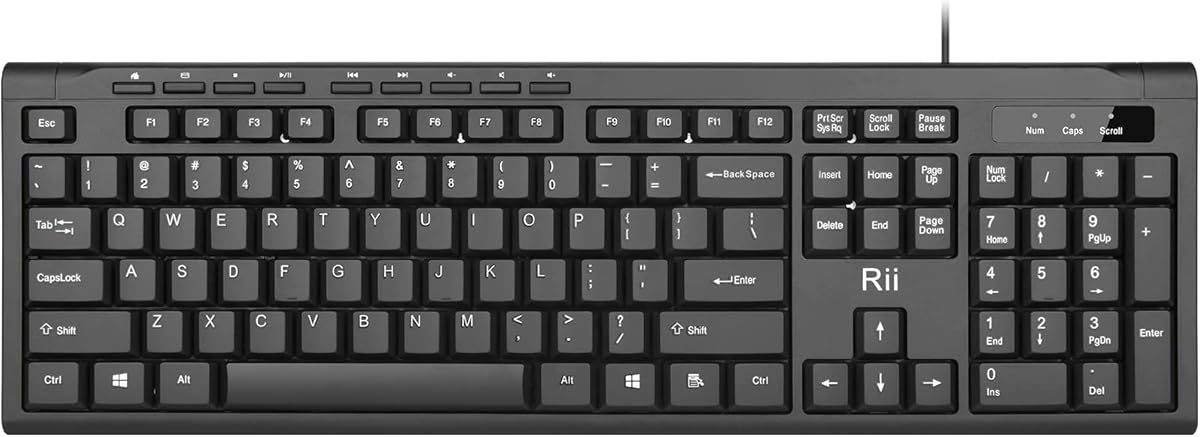
The Rii RK907 provides an ultra-slim typing surface. Its thin profile fits under monitors easily. A wired connection ensures zero latency and stable performance always.
We may earn a commission when you buy through this link, at no additional cost to you.
Low profile keys offer a quiet and comfortable feel. Splash resistance adds durability against accidental spills. The budget-friendly price makes it accessible for casual users.
Lack of wireless limits flexibility to the desk. Users must accept cable management for this thin design. It works best where space is extremely tight.
Ideal for desktop users needing a second keyboard. If space is your priority this slim profile helps. It delivers basic reliability without extra cost or features.
Slim form factor maximizes under monitor clearance. This helps keep desk space clear for other tasks.
Protected circuitry guards against liquid spills. This extends lifespan in office environments with drinks.
We may earn a commission when you buy through this link, at no additional cost to you.
The Logitech MX Keys Mini delivers high end wireless typing. It uses ambient light sensors to save energy. Keys are shaped for ergonomic comfort during writing tasks.
We may earn a commission when you buy through this link, at no additional cost to you.
Multi OS support allows switching between Mac Windows and Linux. Integration with Logitech mice enhances cross computer control. USB-C rechargeable battery offers long use between charges.
Navigation relies on function combinations rather than arrow keys. This saves space but requires a learning curve. The price is higher reflecting premium materials and smart tech.
Ideal for creators needing precision and mobility. If you value build quality this stands out well. It is a top choice for professional workflows.
Sensors detect hands to trigger backlight automatically. This feature balances visibility with battery conservation well.
Works seamlessly with MX mice for flow control. This setup boosts productivity across multiple screens easily.
We may earn a commission when you buy through this link, at no additional cost to you.
The ProtoArc XK04 fits easily into a phone case. Its two-fold design creates a tiny typing surface. The PU leather cover protects keys from scratches in bags.
We may earn a commission when you buy through this link, at no additional cost to you.
Bluetooth 5.1 provides a reliable connection range. Rechargeable battery ensures readiness when needed often. The compact layout suits texting or quick emails on the go.
Small keycaps require careful typing to avoid mistakes. This may slow speed compared to full-size boards. It is optimized for portability over raw typing performance.
Ideal for mobile users needing quick input. If you use tablets often this helps bridge the gap. It is a smart carry option for travelers.
Fits inside a standard pouch or pocket easily. This makes it ideal for pocket carry without bulk.
PU cover protects keys from dust and scratches. This keeps the device clean during daily travel.
We may earn a commission when you buy through this link, at no additional cost to you.
The Arteck 2.4G Stainless combines metal look with value. Its ultra-thin profile suits modern desk aesthetics. The stainless steel top adds durability to a budget device.
We may earn a commission when you buy through this link, at no additional cost to you.
A built-in battery offers six months of runtime. USB charging keeps it running without replacing cells. Quiet keys ensure no noise during work calls.
Wireless range is standard and limited to the USB receiver. This restricts use to a single workstation. Lack of backlight limits night typing compared to others.
Ideal for home office users wanting a metal look. If you value style and price this fits well. It balances form with function effectively for daily tasks.
Steel top plate gives a premium professional feel. This look stands out compared to plastic competitors.
Rechargeable battery reduces waste over time. This design supports sustainable office practices well.
We may earn a commission when you buy through this link, at no additional cost to you.
The Logitech K400 Plus focuses on TV entertainment. An integrated touchpad eliminates the need for a mouse. This makes navigating menus on a large screen easy.
We may earn a commission when you buy through this link, at no additional cost to you.
Battery life reaches up to 18 months. This durability ensures long service without frequent changes. Spill resistance protects against accidental kitchen spills.
Weight is higher making it less comfortable on the lap. Its larger size is better suited for armrest use. It is optimized for living room setups specifically.
Ideal for HTPC or media center setups. If you control a PC from a sofa this works well. It combines keyboard and touchpad into one device.
Touchpad allows cursor control without a mouse. This simplifies media navigation significantly for users.
Dedicated media keys provide quick access to functions. This improves the living room entertainment experience.
We may earn a commission when you buy through this link, at no additional cost to you.
Selecting the right lightweight keyboard depends on your specific usage scenarios. Consider connection types layout and build materials before making a decision.
Wireless models using Bluetooth or USB dongles offer freedom from cables. Bluetooth is better for modern devices lacking USB ports. Wired options provide zero latency for gaming.
Choose wireless for portability and clean setups. Wired is best for stable performance needs.
Full-size layouts include number pads for data entry. Compact 65% or minimalist layouts save desk space. Foldable boards prioritize extreme portability over size.
Pick full-size for office data tasks. Compact is best for travel and small desks.
Membrane switches are quiet and affordable. Scissor switches offer a laptop-like feel with low profile keys. Mechanical switches provide tactile feedback but add weight.
Use membrane or scissor for quiet offices. Mechanical suits typists needing tactile response.
Ultra-slim keyboards fit in bags easily. Foldable designs offer compact storage but require setup. Consider total weight including any protective cases or covers.
Prioritize weight under 12oz for daily carry. Foldable is good for short trips.
Rechargeable batteries reduce waste but require cables. AAA batteries are easy to replace but cost over time. Solar options exist but are rare in this category.
Choose rechargeable for eco-friendly use. Replaceable batteries suit remote areas.
Stainless steel tops offer sturdier protection than plastic. Splash resistance helps prevent liquid damage. Look for hinge strength if choosing foldable models.
Select metal builds for office longevity. Plastic is fine for light home use.
Some models support switching between three devices. This helps users managing phones tablets and laptops. Check OS compatibility before buying.
Use multi-device for workflow efficiency. Single device is fine for dedicated stations.
Backlights help visibility in dim environments. Smart sensors save battery by activating only when needed. Non-backlit models are lighter and cheaper.
Choose backlighting for night work. Skip it to save weight.
Pair your wireless keyboard by enabling Bluetooth on your device. Press the Easy-Switch button if supported to toggle connections. Ensure the receiver is plugged in for 2.4GHz models.
Clean your keyboard by turning it upside down to remove debris. Use a soft brush to clean between keys. Avoid harsh chemicals that could damage keycaps.
Store foldable models properly to avoid hinge wear. Place them in a case to prevent scratches. Keep batteries charged to extend overall lifespan.
The Logitech Pebble Keys 2 K380s is among the lightest options. It weighs only 1.32 lbs. This slim profile makes it ideal for travel or portable setups.
Many models use stainless steel or reinforced hinges. Build quality varies by price. Look for splash resistance and warranty details for best durability.
Some compact boards like the GEODMAER support gaming. Wired connections offer better stability. However mechanical switches may offer better tactile feedback.
Yes, spacing can feel tighter than full-size models. Users may need time to adapt. However modern designs minimize this issue significantly.
Most rechargeable models last months on a single charge. Some use AA batteries lasting a year. Check product specs for accurate runtime estimates.
Bluetooth models like the Logitech MX Keys Mini work best. They support iPadOS shortcuts. Check OS compatibility in the product details.
The GEODMAER and Logitech Pebble offer great value for different budgets. Foldable models like ProtoArc suit frequent travelers needing full keys. Consider your main use case before buying.
Prioritize connectivity type and layout size for daily productivity. Multi-device support is a key feature for modern workers. Durability matters for long term use.
Always check current prices as models vary in value. Reviews and warranty terms help ensure satisfaction. Find the right fit for your workspace today.