
Thrustmaster T-Flight Hotas X
4.5Editor score
Ergonomic Hotas design
Detachable throttle mechanism
High precision joystick
This comprehensive guide compares the top Mac game flight controllers available in 2026, evaluating compatibility, build quality, and simulation fidelity for
Flight simulation on the Mac has evolved significantly, offering enthusiasts realistic tools to master aviation from their home desks. Choosing the right controller is crucial for immersion and precision, especially when navigating complex flight dynamics without dedicated hardware.
We evaluated ten top flight controllers based on build quality, software compatibility, and ergonomic design. Our analysis focuses on how well each device integrates with Mac flight simulators like X Plane and Microsoft Flight Simulator, ensuring a seamless experience.
Each pick highlights specific strengths for different pilot needs, from budget-friendly options to professional-grade yokes. Keep in mind that prices fluctuate frequently, so verifying current deals before purchasing is always recommended for the best value.
4.5Editor score

4.3Editor score

4.4Editor score
The following table offers a side-by-side comparison of the ten most compelling flight controllers available for Mac users, detailing key specifications and features to help you decide quickly.





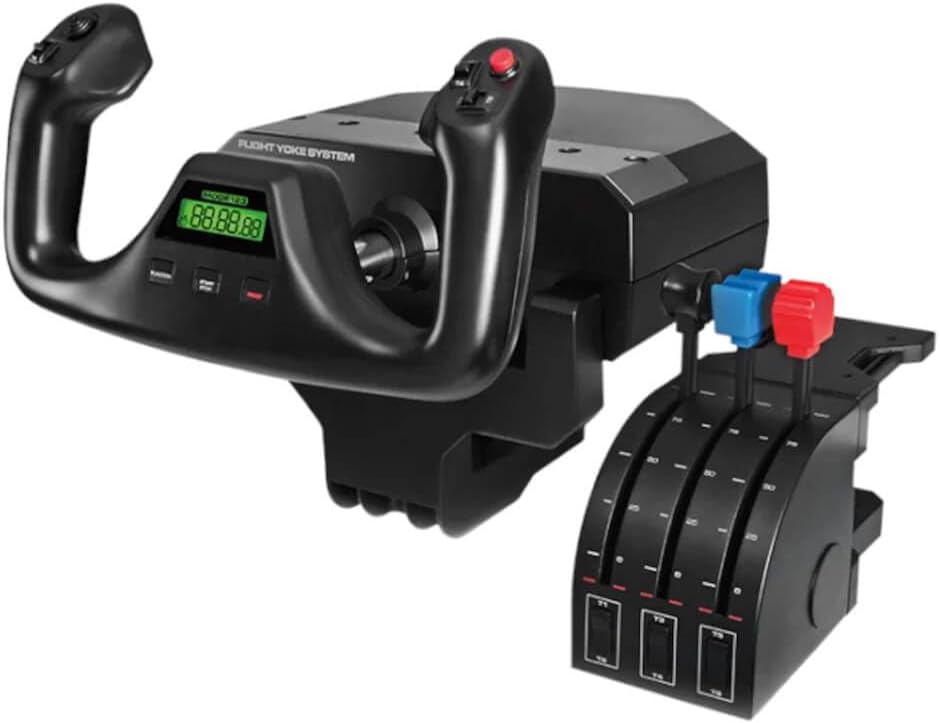

The Logitech G PRO Flight Yoke System stands out as a top choice for Mac users seeking authentic cockpit experiences. With a 4.3 rating, it balances accessibility and professionalism effectively. The stainless steel shaft ensures precision pitch and roll inputs that mimic real aircraft dynamics.
We may earn a commission when you buy through this link, at no additional cost to you.
This system offers at least 54 programmable controls through its 14 buttons, POV hat, and mode switch. This level of customization allows pilots to map essential aircraft functions directly to the yoke without needing complex software overlays. The robust clamping mechanism keeps the unit stable during intense maneuvers.
While excellent for simulation, it does not include rudder pedals, which are necessary for full ground control. However, this limitation is acceptable for users focusing primarily on flight mechanics. The cable lengths are sufficient for typical desk setups without adding clutter.
This controller is ideal for aspiring pilots and experienced simmers wanting realistic tactile feedback on their Mac. Its build quality and control density justify the investment for serious flight simulation enthusiasts looking for long-term durability and accuracy.
The stainless steel shaft provides a smooth, consistent resistance that mimics real-world aerodynamic forces, enhancing immersion during flight.
With over 50 programmable inputs, users can manage complex avionics and flight systems efficiently without switching modes frequently.
We may earn a commission when you buy through this link, at no additional cost to you.
The Thrustmaster T-Flight Hotas X is a budget-friendly option that delivers impressive performance for Mac flight simulations. Rated 4.5, it offers a comfortable ergonomics design that supports long flying sessions without fatigue. The detachable throttle adds flexibility to desktop arrangements.
We may earn a commission when you buy through this link, at no additional cost to you.
Its 12 action buttons and 5 axes are fully programmable, allowing users to tailor controls to specific game needs. The adjustable resistance dial lets pilots fine-tune stick tension, ensuring smooth and responsive aerial maneuvers. The built-in memory saves profiles even when disconnected.
This unit lacks advanced features like multi-button arrays or high-end sensors, which might limit complex setups. However, for entry-level pilots or those with limited space, the compact footprint and plug-and-play functionality make it highly practical and easy to use.
Pilots seeking an affordable yet reliable entry into flight simulation will appreciate the value and versatility of this unit. It serves as an excellent starting point for those building a cockpit setup on a tighter budget while maintaining good build quality and comfort.
The throttle can be separated from the joystick, allowing users to customize their desk layout for better comfort and reach.
Built-in memory allows you to save custom mappings instantly, ensuring your preferred settings are ready whenever you start the game.
We may earn a commission when you buy through this link, at no additional cost to you.
The Honeycomb Alpha Flight Controls system is designed by aerospace engineers to replicate real cockpit feel on Mac systems. Rated 4.4, it offers a full 180-degree yoke rotation and dual linear ball bearings for unmatched smoothness. The included switch panel enhances realism significantly.
We may earn a commission when you buy through this link, at no additional cost to you.
Its self-centering mechanism ensures minimal dead zones, crucial for precise instrument approaches and holding patterns. The switch panel includes essential aviation switches like master, alternator, and avionics, streamlining flight management. Heavy-duty clamps secure the unit firmly to various desk thicknesses.
While premium in cost, the level of detail and build quality justifies the investment for serious enthusiasts. Some users may find the base large, but the stability it provides during intense maneuvers is worth the footprint. The design prioritizes functional accuracy above all else.
This system is ideal for Mac users committed to high-fidelity flight simulation who demand realistic tactile feedback. It bridges the gap between consumer peripherals and professional training tools, offering a deeply immersive experience that enhances every aspect of virtual aviation.
The included switch panel replicates real aircraft controls, allowing users to manage power systems and avionics directly without software menus.
Dual linear ball bearings ensure friction-free movement, mimicking the precise control feel found in real light aircraft cockpits.
We may earn a commission when you buy through this link, at no additional cost to you.
The Logitech G X56 H.O.T.A.S provides extensive programmability for Mac flight enthusiasts who need maximum control options. With a 4.0 rating, it offers over 189 programmable controls, enabling deep customization for both civil and military flight simulations. The hall-effect sensors ensure precise input detection.
We may earn a commission when you buy through this link, at no additional cost to you.
Features like RGB backlighting and mini analog sticks enhance immersion and functionality during complex missions. The advanced 4-spring system allows users to adjust stick force to their preference, ensuring comfortable handling during long sessions. Twin throttles offer independent control for dual-engine aircraft.
The complexity of this device can be overwhelming for newcomers, requiring significant time to configure effectively. However, for dedicated pilots who want every function accessible at their fingertips, the trade-off in learning curve is worthwhile. It remains a powerful tool for professional-grade setups.
Mac users seeking extensive control options and high customization should consider this unit despite the setup complexity. It is particularly suitable for users interested in military flight sims or complex cargo operations where having every switch reachable is critical for success.
With nearly 190 programmable controls, users can map virtually every aircraft function to the hardware without switching modes.
The adjustable spring system allows pilots to tune the force needed to move the stick, matching the feel of different aircraft types.
We may earn a commission when you buy through this link, at no additional cost to you.
The Turtle Beach VelocityOne Flightstick offers modern features like an OLED display and touchpad navigation for Mac flight simulations. With a 4.2 rating, it uses non-contact sensors to ensure smooth, accurate inputs. The ambidextrous design suits both left and right-handed users comfortably.
We may earn a commission when you buy through this link, at no additional cost to you.
The OLED flight management display provides real-time data without needing to switch to a separate monitor, enhancing immersion. The touchpad allows for precise cursor control, which is helpful for managing complex menus in simulators. Its compact build makes it suitable for smaller desk setups.
While innovative, compatibility with certain Mac-specific software can sometimes be less seamless than other options. The button count is lower than premium competitors, which might limit complex mappings. However, the intuitive layout and high-quality sensors make it a strong contender for many users.
Pilots looking for a modern, feature-rich controller that simplifies complex interactions should find this unit appealing. It balances advanced functionality with ease of use, making it a strong choice for those wanting to upgrade from basic controllers without a major budget increase.
The integrated OLED screen displays vital flight info directly on the controller, keeping pilots focused on the flight rather than external monitors.
A dedicated touchpad enables precise cursor navigation, useful for managing complex avionics menus and settings during flight.
We may earn a commission when you buy through this link, at no additional cost to you.
The Logitech G Saitek X52 Pro is a classic controller that continues to serve Mac users well with its proven design. Rated 3.9, it features an LCD multi-function display for clear status feedback during flights. The progressive throttle with detents offers precise thrust control for various flight phases.
We may earn a commission when you buy through this link, at no additional cost to you.
Its no-contact technology on the X and Y axes ensures durable, smooth movement over time. The 5-position handle adjustment system allows users to find a comfortable grip regardless of hand size, enhancing ergonomics during long sessions. The illuminated buttons add to the cockpit feel.
Despite its age, the build quality remains high, though some users may find the software less intuitive than newer models. The lower rating reflects minor connectivity issues reported by some users. However, for those seeking a reliable, well-established controller, it remains a solid option.
Mac users looking for a dependable, comfortable controller with good feedback features will appreciate the X52 Pro. It is particularly suitable for pilots who value established reliability and ergonomic comfort over the latest flashy features or connectivity updates.
The illuminated LCD screen provides instant access to critical flight data, helping pilots monitor key systems without leaving the cockpit view.
The five-position handle adjustment ensures a comfortable fit for all hand sizes, reducing fatigue during extended flight simulations.
We may earn a commission when you buy through this link, at no additional cost to you.
The Logitech G Pro Flight Yoke Bundle combines the popular yoke system with rudder pedals for a comprehensive Mac flight setup. Rated 4.6, it provides realistic rudder control and differential toe brakes essential for ground maneuvering. The bundle ensures a complete pilot experience right out of the box.
We may earn a commission when you buy through this link, at no additional cost to you.
Foot rests are adjustable to accommodate different user sizes, ensuring comfort during long flights. The yoke system retains the familiar stainless steel shaft and programmable controls praised in standalone models. This bundle simplifies the buying process for those wanting a full cockpit interface.
The main trade-off is the cost and space required for the pedals and yoke together. Users must have adequate floor and desk space to install everything correctly. However, the convenience and performance gains make it a preferred choice for serious simmers seeking realism.
Pilots looking to complete their cockpit setup with essential rudder controls should consider this bundle highly. It offers excellent value for those wanting everything in one package, ensuring consistent performance and compatibility between the yoke and pedals without third-party hassles.
The addition of rudder pedals with differential toe brakes allows precise steering on the ground, essential for realistic takeoffs and landings.
Both units work seamlessly together within the Logitech ecosystem, ensuring stable connectivity and consistent performance across all inputs.
We may earn a commission when you buy through this link, at no additional cost to you.
The Turtle Beach VelocityOne H.O.T.A.S. offers an extensive range of programmable inputs for advanced flight simulation on Mac. With a 2.6 rating, it boasts 73 programmable inputs and 15 axes for detailed control. The Hall-effect sensors ensure high precision across all axes for smooth operation.
We may earn a commission when you buy through this link, at no additional cost to you.
Features like swappable throttle detents and adjustable stick tension provide tactile feedback essential for combat scenarios. The full-color display supports real-time flight data, aiding in quick tuning and performance monitoring. Customizable RGB lighting allows users to match their cockpit aesthetic.
The lower user rating indicates potential connectivity or software issues that may hinder the experience. It is complex to set up and manage, which might deter casual users. However, those willing to invest time in configuration can unlock significant control flexibility and immersion.
Mac enthusiasts needing maximum input options for complex missions might find value here despite the setup challenges. It is best suited for users who prioritize extensive control mapping over immediate plug-and-play simplicity or higher user satisfaction ratings.
With 73 programmable inputs and 15 axes, pilots can assign virtually every function to hardware, reducing reliance on keyboard shortcuts.
Adjustable stick tension and swappable detents allow pilots to fine-tune the physical feel, matching different aircraft characteristics effectively.
We may earn a commission when you buy through this link, at no additional cost to you.
The Logitech G PRO Flight Yoke Standard provides a balanced control solution for Mac flight enthusiasts seeking reliable performance. Rated 4.4, it offers 75 programmable controls and a 3-position mode switch for managing different aircraft functions. The integrated USB hub simplifies cable management for other peripherals.
We may earn a commission when you buy through this link, at no additional cost to you.
Its stainless steel shaft ensures smooth pitch and roll control, essential for accurate flight simulation. The throttle quadrant includes configurable knobs, allowing for fine adjustments during flight. This combination of features delivers a practical experience for a wide range of users.
While solid, it lacks the advanced customization found in higher-end models like the X56. Users may need to spend time setting up software to fully utilize all buttons. However, for those wanting a straightforward, reliable yoke system, it serves the purpose effectively without unnecessary complexity.
Mac users looking for a dependable, standard flight setup will find this unit a good match. It provides essential controls and stability for most simulation needs, making it a safe choice for those prioritizing function and reliability over advanced features.
An integrated USB hub helps organize cables by connecting other peripherals directly to the controller, reducing clutter on the desk.
The stainless steel shaft provides durable, smooth movement, ensuring precise control inputs that mimic real aircraft behavior accurately.
We may earn a commission when you buy through this link, at no additional cost to you.
The Logitech G Saitek PRO USB Flight Yoke System (Renewed) offers a cost-effective way to experience flight simulation on Mac. Rated 4.2, it retains the core features of the original model, including precision bearings and a chronograph display. This version is compatible with Mac OSX systems.
We may earn a commission when you buy through this link, at no additional cost to you.
With 14 buttons and a 3-position mode switch, users can manage essential flight controls without needing complex external mapping. The refurbished status means it is tested for functionality but may show signs of previous use. It serves as an entry point for budget-conscious users.
While older, the design remains robust enough for home simulation use. Users should verify the condition upon arrival to ensure all parts are functional. The lower price compared to new units makes it an attractive option for those willing to take the risk of refurbished goods.
Pilots starting out who want to test the waters without a large investment should consider this renewed option. It provides essential flight control features at a reduced cost, allowing users to decide if a full simulation setup is right for them.
Buying a renewed unit allows new pilots to access professional-style controls at a lower price, making flight simulation more accessible.
This unit explicitly supports Mac OSX operating systems, ensuring it works well with flight simulators running on Apple hardware.
We may earn a commission when you buy through this link, at no additional cost to you.
Selecting the right flight controller for your Mac requires careful consideration of compatibility, build quality, and specific simulation needs.
Not all flight controllers offer native support for macOS, so verify that the device works with your specific version of the operating system. Many products list Windows compatibility first, but some include Mac drivers or work via universal HID protocols.
Always check the manufacturer's website for Mac-specific drivers or community-supported solutions before purchasing to ensure seamless integration with your favorite simulators.
High-quality materials like stainless steel shafts and precision bearings ensure long-term reliability and smooth operation. A robust construction helps withstand intense maneuvers and frequent use, maintaining performance over years of flight simulation.
Invest in devices with solid clamping mechanisms and ergonomic designs to prevent wear and fatigue during extended flying sessions.
A higher number of programmable buttons and axes allows you to map more aircraft functions directly to the controller. This reduces reliance on keyboard shortcuts and enhances immersion by making critical systems accessible at your fingertips.
Choose a controller that offers flexible mapping options and customizable resistance to tailor the experience to your specific aircraft preferences.
The throttle configuration significantly impacts comfort and realism. Detachable throttles offer flexibility in desk layout, while integrated units save space. Consider whether you need separate throttle knobs for dual-engine or multi-engine aircraft.
Select a throttle with smooth movement and precise detents to control speed effectively without accidental changes during flight.
Strong software tools allow for easy configuration, profile management, and advanced customization. Look for controllers that include intuitive mapping software and support multiple profiles for different aircraft types.
Ensure the software is updated regularly to maintain compatibility with newer flight simulator versions and operating system updates.
Flight controllers often require significant desk and floor space. Yokes need sturdy mounting points, while rudder pedals need floor space. Measure your available area before purchasing to ensure the device fits comfortably without obstructing movement.
Consider compact hotas options if desk space is limited, as they offer a smaller footprint while still delivering precise flight controls.
Compatibility with additional peripherals like VR headsets, trackIR, or extra switches can enhance your simulation experience. Ensure the controller has enough USB ports or can easily integrate with other devices in your setup.
Check if the controller supports simultaneous use with other input devices to avoid conflicts during complex flight simulations.
Flight controllers range from affordable entry-level sticks to professional-grade systems. Determine your budget and prioritize features that matter most to your simulation style. A higher price does not always guarantee better suitability for casual use.
Balance cost with longevity and feature set to ensure you get the best value for your specific flight simulation needs.
Proper installation involves securely mounting the device using clamps or mounting pads to ensure stability during use. Ensure all cables are connected firmly to the USB ports on your Mac to maintain consistent data transmission without interruptions.
Customizing controls through the manufacturer's software allows you to map keys to specific aircraft functions. Take time to create profiles for different planes or missions to enhance realism and efficiency during flight sessions.
Regular maintenance includes cleaning dust from buttons and joints, checking cable integrity, and ensuring the base remains secure. Storing the device in a dry environment protects internal electronics and extends its lifespan over time.
Most controllers work with popular simulators like Microsoft Flight Simulator and X-Plane, but you should verify specific compatibility on the product page. Some older units may require community drivers or workarounds for newer macOS versions.
Yes, manufacturers typically provide dedicated software for mapping buttons and adjusting sensitivity. This software is essential to unlock the full potential of programmable controls and customize settings for different aircraft.
Yes, many controllers are compact enough for Macbook setups, but ensure you have enough USB ports or use a hub for connection. The ergonomic design should also fit comfortably with laptop setups on smaller desks.
A yoke mimics the steering wheel of a plane, ideal for civilian aviation, while a joystick (hotas) is better for military fighter jets. Choosing depends on the type of aircraft you plan to simulate primarily.
Use a soft, slightly damp cloth to wipe down the surface gently. Avoid using excessive water or harsh chemicals, and ensure the device is unplugged before cleaning to prevent damage to internal components.
Yes, most Mac systems support multiple USB devices, so you can connect pedals, throttles, or second joysticks simultaneously. Ensure the game supports multi-device input for all connected hardware to function correctly.
The Logitech G PRO Flight Yoke System and Honeycomb Alpha Flight Controls stand out as top picks for immersion and realism in 2026. The Thrustmaster T-Flight Hotas X offers exceptional value for those starting out with a tight budget.
Consider your specific simulation needs when selecting a controller. If you focus on commercial aviation, a yoke offers better ergonomics, whereas military fans may prefer a hotas setup for quicker response times.
Always verify current prices and compatibility before making a final decision. Flight simulation evolves rapidly, and keeping your hardware updated ensures the best possible experience on your Mac system.