
Redragon K617 HE Wired Hall-Effect Rapid Trigger Magnetic Gaming Keyboard
4.3Editor score
Hall Effect Magnetic Switches
Software Adjustable Actuation
Compact 60 Percent Layout
Discover the top keyboards for CS2 optimized for rapid trigger and Hall effect switches to enhance your gameplay precision and speed in competitive matches.
Finding the right keyboard for CS2 can significantly impact your performance in competitive matches. The right device offers rapid response times and precise actuation to help you react quickly during intense firefights.
We evaluated the best options based on switch technology, polling rates, and build quality. Our comparison focuses on models that support rapid trigger and Hall effect sensors for enhanced gaming precision.
Each pick highlights key features and performance characteristics to guide your decision. Note that availability and stock may change over time, so verify current details before purchasing.
4.3Editor score
4.4Editor score
4.5Editor score
The following table provides a side-by-side comparison of all ten keyboards analyzed in this guide. Review the specifications to identify the model that best fits your competitive needs.



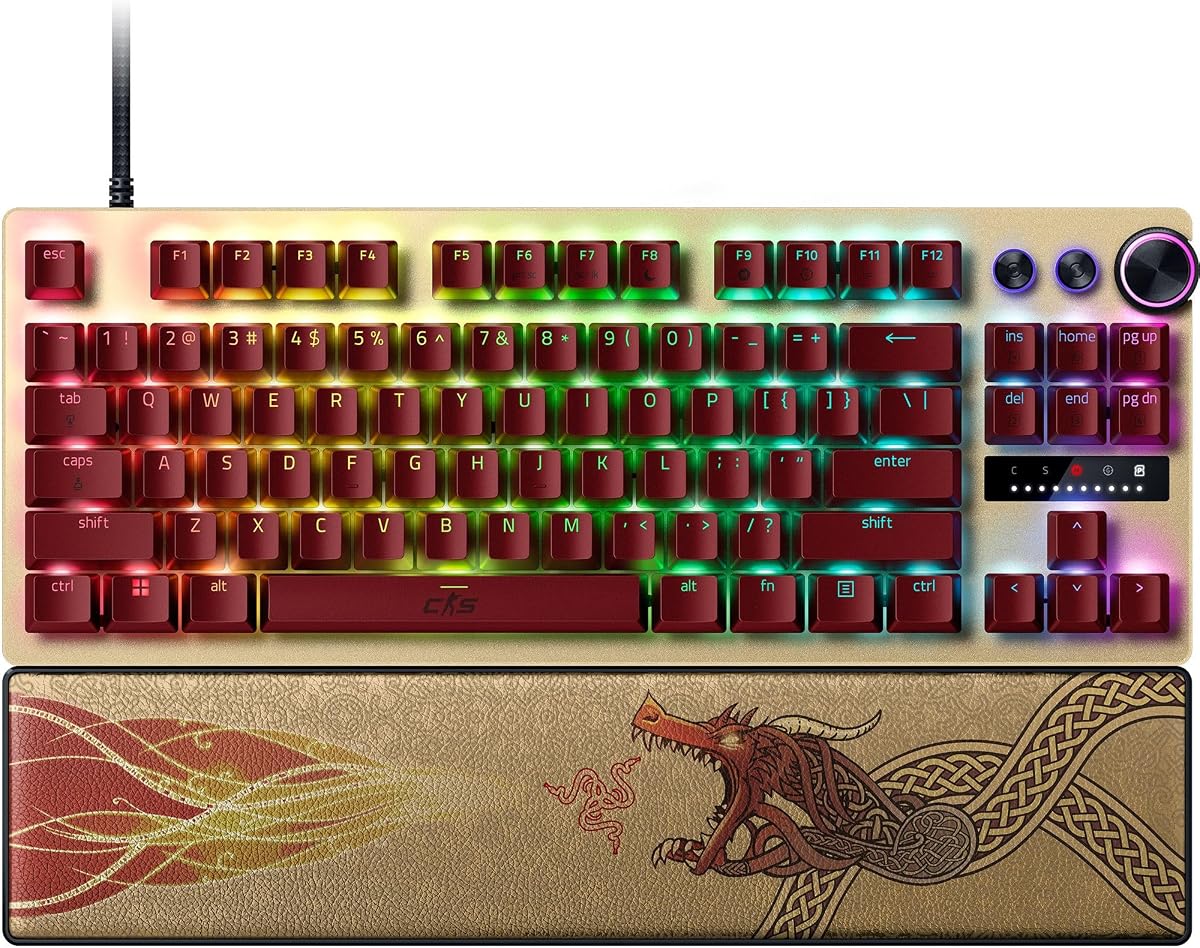
The Razer Huntsman V3 Pro TKL stands out as the top choice for competitive players seeking precision. Rated highly for its advanced switch technology, this keyboard delivers the responsiveness required for high-level play.
We may earn a commission when you buy through this link, at no additional cost to you.
Its Rapid Trigger technology allows keys to reset at the slightest lift of a finger, which is crucial for quick counter-strafing and movement in FPS titles. The Snap Tap mode further enhances directional changes by prioritizing the latest input between two keys.
While the pricing is higher than standard options, the investment in durable PBT keycaps and analog optical switches ensures longevity and consistent performance under pressure. These features justify the cost for serious competitors.
Serious CS2 players looking for a competitive edge should consider this model. The combination of advanced switch tech and ergonomic support makes it a top-tier choice for intense gaming sessions.
This feature resets keys instantly upon release, eliminating traditional reset points for faster reaction times.
Prioritizes the latest input between two keys without releasing the previous one for smoother directional changes.
We may earn a commission when you buy through this link, at no additional cost to you.
The Redragon K617 HE offers exceptional value for gamers on a budget. Rated for its Hall Effect switches, it provides rapid trigger functionality that is typically found in more expensive models.
We may earn a commission when you buy through this link, at no additional cost to you.
Users can fine-tune each key's trigger point through software, allowing for personalized sensitivity settings. The 8000Hz polling rate ensures inputs are registered faster than standard keyboards, improving responsiveness during gameplay.
The compact 60 percent layout frees up desk space for wider mouse movements, which is beneficial for low-sensitivity aiming. While the software is basic, it effectively supports the core tuning features needed for competitive play.
Players seeking affordable performance without sacrificing speed should choose this keyboard. Its feature set makes it a strong contender for entry-level and intermediate CS2 competitors.
Hall Effect sensors detect keypresses without physical contact for faster response and longer lifespan.
Removing the numpad and nav cluster provides more room for wide mouse swipes during aiming.
We may earn a commission when you buy through this link, at no additional cost to you.
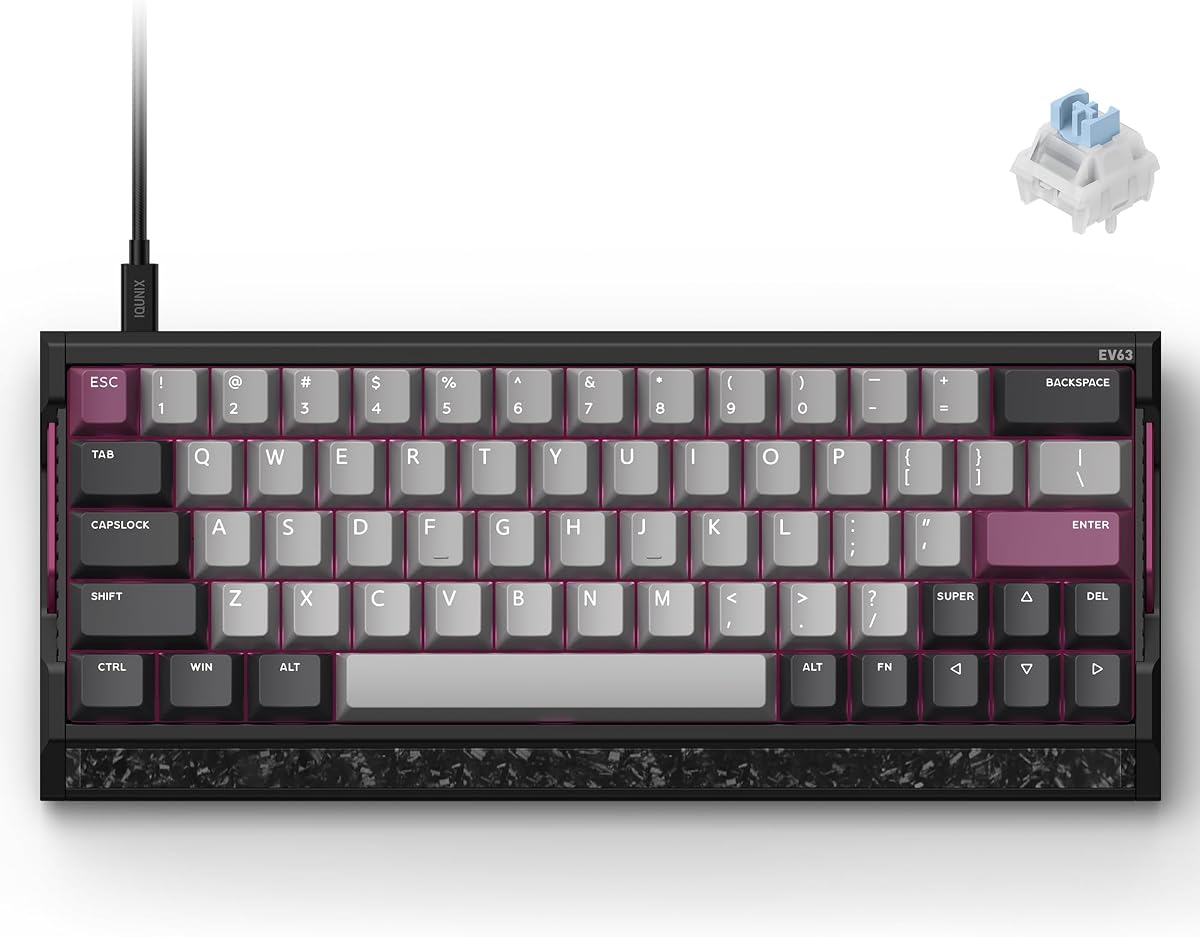
The IQUNIX EV63 is a high-end option designed for players who demand premium build quality and stability. It features an aluminum case with a forged carbon front plate, ensuring minimal vibration during intense use.
We may earn a commission when you buy through this link, at no additional cost to you.
Its Rapid Trigger technology supports 0.01mm sensitivity, allowing for extremely precise control over input timing. The M.A.T. 2.0 algorithm helps reduce missed inputs and sticky behavior, which is vital for consistent movement.
Driver 3.0 allows users to switch between custom, office, and eSport profiles easily. While the price is high, the durability and advanced tuning options make it a worthwhile investment for serious competitors.
Competitors who prioritize build quality and advanced features will appreciate this keyboard. Its design focuses on providing a solid foundation for high-level gameplay.
The aluminum chassis reduces desk movement and case vibration for a planted, consistent feel.
M.A.T. 2.0 checks keys in real time to reduce missed inputs during rapid movements.
We may earn a commission when you buy through this link, at no additional cost to you.
The Redragon K686 HE simplifies control with a dedicated knob for brightness and media playback. This feature allows users to manage settings without memorizing key combos, streamlining the gaming experience.
We may earn a commission when you buy through this link, at no additional cost to you.
Its UltraMag POM magnetic switches provide a soft, silky feel that is quieter than harsh mechanical clacks. The dual-module floating structure adds noise dampening layers to reduce unwanted sound during play.
Rapid Trigger support ensures inputs are registered quickly, aiding in fast direction changes. The software allows for actuation profile tuning to match your specific playstyle preferences.
Players who want ease of use and a quieter typing experience will find this keyboard suitable. It balances performance with convenience for a well-rounded option.
A single control knob manages backlight brightness and media playback for efficient adjustment.
Anti-wobble independent switch-plate design paired with dampening layers reduces harsh sound.
We may earn a commission when you buy through this link, at no additional cost to you.
The Redragon K673 HE focuses on providing precise actuation control through its software driver. Users can save multiple actuation profiles to switch between different game preferences easily.
We may earn a commission when you buy through this link, at no additional cost to you.
Its magnetic switches detect keypresses without physical contact, ensuring consistent performance over time. The 8,000Hz polling rate transmits inputs significantly faster than standard keyboards for quicker reactions.
Noise dampening layers in the structure help provide a softer feel and quieter operation. This model is ideal for those who want detailed control over their input settings.
Gamers looking for customizable feel without high cost should consider this option. It offers solid performance for competitive play with essential tuning features.
Save profiles between 0.1mm and 3.4mm to calibrate switches for specific game needs.
Wired connection transmits inputs up to 8x faster than standard keyboards for speed.
We may earn a commission when you buy through this link, at no additional cost to you.
This TKL model is engineered for elite competitive play with advanced analog optical switches. It allows for precise adjustments to actuation height and Rapid Trigger sensitivity using onboard visual aids.
We may earn a commission when you buy through this link, at no additional cost to you.
Snap Tap mode prioritizes the latest input for near-instant directional changes, which is crucial for movement in FPS games. Multi-function dial and dedicated buttons help manage settings efficiently without interrupting gameplay.
The onboard adjustments allow saving settings directly to the keyboard without software, ensuring consistency across different machines. While the price is premium, the features are tailored for serious competitive players.
Elite players who need specific movement controls will benefit from this keyboard. Its design focuses on reducing input latency and enhancing control during matches.
Advanced switches offer ultra fast repeated inputs and adjustable actuation range up to 4.0 mm.
Make adjustments on-the-fly with onboard LEDs and save settings without software installation.
We may earn a commission when you buy through this link, at no additional cost to you.
The Corsair Clipper PRO MINI is designed to maximize mouse space for low-sensitivity aiming. Its compact layout allows for cleaner directional inputs through FlashTap SOCD technology.
We may earn a commission when you buy through this link, at no additional cost to you.
Ultra-fast MGX Hyperdrive Core Hall Effect switches provide zero drift and high durability. The IP57-rated durability ensures the keyboard can handle spills and dust during intense sessions.
Adjustable actuation supports competitive performance, allowing you to tune keys to your preference. This model is ideal for players who prioritize desk space and fast input registration.
Players needing a compact solution with high durability will find this keyboard useful. It balances space efficiency with performance features.
FlashTap SOCD enables cleaner directional inputs and sharper counter-strafing for accuracy.
IP57 rating protects against water and dust to ensure longevity during intense play.
We may earn a commission when you buy through this link, at no additional cost to you.
The Redragon K745 HE combines gaming performance with vibrant RGB lighting to create a true eSports vibe. It supports software-powered precision tuning for consistent performance across different games.
We may earn a commission when you buy through this link, at no additional cost to you.
Its magnetic switches detect keypresses without physical contact, ensuring quick response times. The noise dampening layers help provide a softer feel compared to traditional mechanical switches.
The 8,000Hz polling rate ensures inputs are transmitted faster than standard keyboards. Users can adjust brightness and lighting modes to match their desk setup preferences.
Players seeking style alongside performance will appreciate this keyboard's features. It offers essential tuning capabilities in a visually appealing package.
Adjustable brightness and lighting modes bring your desk to life day or night.
Save multiple actuation profiles and calibrate switches through a desktop or web driver.
We may earn a commission when you buy through this link, at no additional cost to you.
The Keychron C0 HE 8K provides competitive-grade performance in a compact one-handed layout. It is built for high-level FPS gameplay with an 8K polling rate and rapid trigger Hall Effect switches.
We may earn a commission when you buy through this link, at no additional cost to you.
Users can trigger scenes, control push-to-talk, or execute complex commands with one hand. The web-based configurator allows customization without requiring software installation.
Inputs are detected based on real-time key travel rather than fixed points, enabling finer control. This keypad is ideal for those who need essential commands within reach without moving hands far.
Streamers or players needing quick access to macros will find this device useful. It offers a specialized solution for optimized workflows.
Inputs are detected based on real-time key travel rather than fixed actuation points.
Customize mappings through a browser-based configurator compatible with Windows and macOS.
We may earn a commission when you buy through this link, at no additional cost to you.
This renewed version of the Razer Huntsman V3 Pro TKL provides similar features to the new model. It includes Rapid Trigger technology and adjustable actuation for responsive input control.
We may earn a commission when you buy through this link, at no additional cost to you.
Snap Tap mode prioritizes the latest input between two selected keys for better directional changes. Onboard LED arrays allow for on-the-fly adjustments without needing external software.
The magnetic leatherette wrist rest provides ergonomic support for long training sessions. While it is a renewed item, it offers access to advanced features for competitive play.
Budget-conscious players looking for premium features may consider this option. Ensure you check the condition details before purchasing for best results.
Make precise adjustments with visual aid of onboard LED array and save without software.
Manage volume and analog settings with a dedicated digital dial and control buttons.
We may earn a commission when you buy through this link, at no additional cost to you.
Selecting the right keyboard involves understanding key performance factors that impact gameplay precision and speed.
Magnetic Hall Effect switches are essential for competitive CS2 play due to their ability to reset keys instantly upon release. This rapid trigger capability ensures that movement inputs are registered without delay.
Look for keyboards that explicitly support Rapid Trigger technology to gain an advantage in fast-paced scenarios.
A higher polling rate ensures that your inputs are registered by the computer faster. For competitive gaming, an 8000Hz polling rate is recommended to minimize input lag.
Ensure the keyboard supports high polling rates to maintain consistent performance during intense matches.
The ability to adjust actuation points allows you to customize key sensitivity to your playstyle. Some keyboards allow adjustments from 0.1mm to 3.0mm or similar ranges.
Choose a keyboard with adjustable actuation to fine-tune keys for different in-game actions.
Compact layouts like 60% or TKL save desk space for wider mouse movements. This is particularly important for low-sensitivity players who need room to aim.
Consider your desk size and mouse requirements when selecting a layout to ensure ergonomic comfort.
Durability is key for long gaming sessions. Look for keyboards with PBT keycaps that resist wear and shine over time.
Water or dust resistance can also help protect the keyboard from accidents during play.
Good software support enables you to save profiles and map macros efficiently. A web-based configurator is often more convenient than installing dedicated software.
Verify that the software allows for complex customization to match your specific needs.
Solid chassis materials like aluminum or forged carbon reduce vibration and stabilize the keyboard. This stability ensures consistent input registration during rapid movements.
Premium builds often provide a better typing feel and longer lifespan.
Ergonomic accessories like wrist rests reduce strain during extended play. Magnetic rests can be easily attached or removed as needed.
Prioritize comfort features to maintain peak performance throughout long training sessions.
To maximize performance, ensure that Rapid Trigger is enabled in the driver settings. This feature resets keys immediately upon release to reduce input delay during movement.
Regularly clean the keycaps using compressed air to remove dust that can interfere with switch sensors. Wipe the surface with a soft cloth to maintain the texture and feel of the keys.
Avoid placing liquids near the keyboard to prevent electrical damage. If the keyboard is water-resistant, allow it to dry completely before reconnecting to ensure safety.
Rapid Trigger allows keys to reset as soon as they are lifted rather than waiting for a fixed point. This reduces input delay and improves movement precision in FPS games like CS2.
Yes, magnetic switches offer faster response times and adjustable actuation points. These features provide the precision needed for quick counter-strafing and aiming.
A high polling rate ensures inputs are registered faster by your computer. This minimizes lag and provides more immediate feedback during fast-paced matches.
Not necessarily, but compact layouts save desk space for wider mouse movements. Choose a layout that fits your desk size and ergonomic preferences comfortably.
Many keyboards allow onboard profile storage so settings persist across different computers. Check the product specs to confirm if this feature is available for your model.
It is recommended to clean your keyboard regularly to remove dust and debris. This prevents interference with switches and maintains overall performance consistency.
The keyboards listed in this guide offer a range of features suitable for competitive play. Models like the Razer Huntsman V3 Pro TKL provide advanced precision while budget-friendly options offer essential performance.
Prioritize Rapid Trigger support and high polling rates to ensure your inputs are registered instantly. These factors are critical for maintaining an edge in intense match scenarios.
Before purchasing, always verify current availability and ensure the keyboard meets your specific ergonomic and technical needs for the best experience.