
Zalman T6 ATX Mid-Tower Desktop PC Case
4.3Editor score
High strength steel sheets
Four fan installation spots
Optimized mesh design
Explore our expert guide comparing the top 10 Industrial PC Case options for 2026, covering durability, airflow, storage, and compatibility for professional
Choosing the right Industrial PC Case is critical for protecting sensitive hardware in demanding environments. Whether you need robust airflow for high-performance computing or secure rackmount options for data centers, the enclosure defines system reliability and longevity in harsh conditions.
Our team analyzed ten top-rated cases based on build quality, thermal performance, and expansion capabilities. We prioritized models that support standard industrial motherboards, offer ample cooling solutions, and provide secure mounting options for professional deployments.
Each pick highlights unique strengths tailored to specific industrial needs like server hosting or workstation computing. Prices fluctuate often so verify current availability and costs before purchasing to ensure you get the best value for your specific infrastructure requirements today.
4.3Editor score

4.6Editor score

4.8Editor score
This side-by-side comparison helps you quickly identify key differences across all ten models. We highlight essential specifications like motherboard support, drive capacity, and cooling options so you can match a case to your specific industrial workload requirements.


This 4U rackmount server case offers massive storage capacity with twelve dedicated hard drive bays making it ideal for data centers. It supports ATX Micro-ATX and Mini-ITX motherboards while featuring seven PCI slots for extensive hardware expansion in professional environments.
We may earn a commission when you buy through this link, at no additional cost to you.
The chassis includes robust key locks and dust filters to maintain a clean internal environment and prevent unauthorized access. Front USB 3.0 ports allow rapid data transfer while LED indicators provide instant system status display for efficient server management tasks.
While the ATX power supply fit is standard users must ensure their coolers do not exceed 125 millimeters without bracket removal. This design effectively optimizes rack mount setups but may require careful planning for large graphics cards beyond 330mm length.
This case is best for enterprise data centers needing scalable storage in a rugged rack-ready chassis. It delivers steadfast reliability for mission critical servers where dust protection and secure access are non-negotiable requirements.
With twelve dedicated bays you can house all critical data games and media files without needing external enclosures.
Key lock mechanisms and side air filters ensure hardware stays secure from theft and environmental debris.
We may earn a commission when you buy through this link, at no additional cost to you.
The Fractal Design Define 7 XL is an expansive full tower case that easily accommodates large E-ATX and SSI-EEB motherboards. Its refined front door design features reversible hinges and magnetic latching combined with brushed aluminum for a premium industrial look.
We may earn a commission when you buy through this link, at no additional cost to you.
You can install up to eighteen HDDs alongside five SSD mounts in the default storage layout or convert to an open layout for custom water loops. Versatile multi-brackets allow unused fan positions to be converted for mounting pumps or storage devices easily.
While the build quality is exceptional the heavy steel chassis can make movement difficult without assistance. The price point is higher than standard mid-towers but the modular flexibility and silence make it a worthy investment for professional workstations.
This case suits users prioritizing silent operation and massive storage in a sleek full tower form factor. It delivers premium aesthetics and adaptability for complex industrial builds requiring significant drive capacity or cooling flexibility.
Designed to minimize noise while maintaining airflow so industrial systems run quietly in office environments.
Up to eighteen HDD mounts provide unmatched local storage for archival or heavy data processing tasks.
We may earn a commission when you buy through this link, at no additional cost to you.
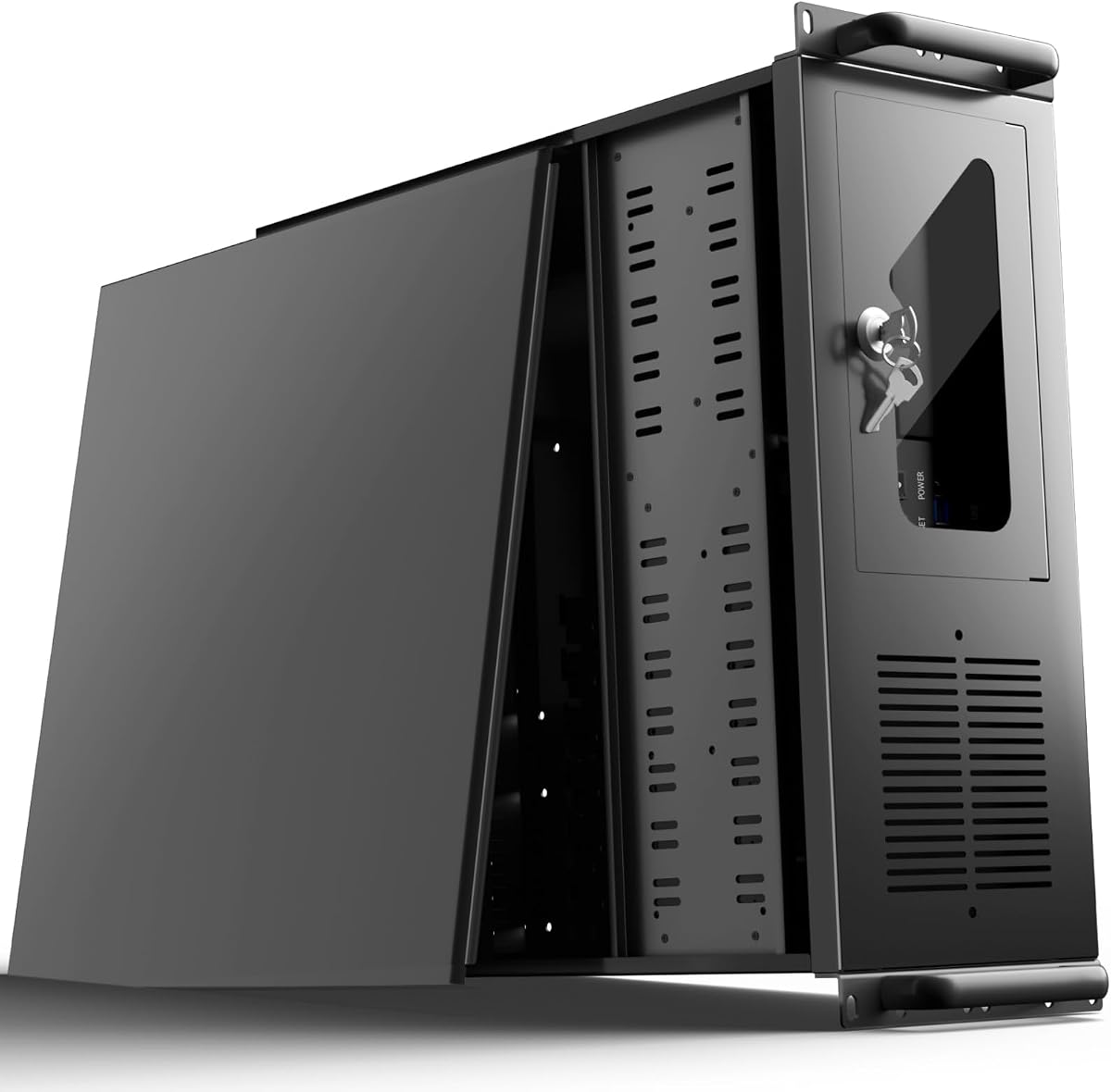
The Zalman T6 offers optimized cooling performance with a hairline pattern front and side mesh design plus a preinstalled rear fan. Made from high strength steel sheets with black powder coating it resists corrosion and heat effectively in demanding settings.
We may earn a commission when you buy through this link, at no additional cost to you.
Its versatile internal layout provides great workspace for building various types of PCs whether for home workstations or office use. Up to four fans can be installed to ensure adequate air circulation for components that generate significant heat.
Users must note that ATX motherboards with side-facing SATA ports will not fit due to the internal design constraints. Despite this limitation the case remains a solid budget-friendly option for standard industrial builds needing reliable ventilation.
This case is ideal for budget-conscious buyers needing a sturdy ATX enclosure for industrial computing tasks. It balances cost and functionality effectively for general office or light gaming workstation environments.
High strength steel sheets withstand high pressure and heat ensuring long-term physical durability in active offices.
Mesh design allows optimal air circulation reducing heat buildup on critical hardware components efficiently.
We may earn a commission when you buy through this link, at no additional cost to you.
The Cooler Master HAF II 500 features an oversized Mighty40 cooling system with two 220mm front intake fans and one 180mm rear exhaust fan. Its low airflow resistance design uses large ventilation openings to improve throughput significantly for industrial hardware.
We may earn a commission when you buy through this link, at no additional cost to you.
Split-level cable management optimizes routing space and creates room for oversized rear exhaust cooling while the MasterRail mounting system supports various fan sizes. A flexible storage cage supports 3.5 and 2.5 inch drives in orientations based on PSU length.
This case is quite large so you need to verify your desk or rack space before purchasing to ensure it fits comfortably. While I/O options are standard the internal thermal performance is exceptional for high-end workstations or render nodes.
Ideal for users needing extreme cooling capacity in a single chassis this case delivers exceptional thermal performance. It balances airflow and cable management effectively for demanding industrial applications.
Large front and rear ventilation openings maximize throughput reducing heat buildup on intensive components.
MasterRail system allows flexible fan placement for targeted cooling and easier component upgrades.
We may earn a commission when you buy through this link, at no additional cost to you.
The Antec VSK4000E-U3_US is an affordable mid-tower built with SGCC steel for reliable durability in office environments. It features front ports including USB 2.0 and USB 3.0 alongside a full set of drive bays for expansion.
We may earn a commission when you buy through this link, at no additional cost to you.
Five internal 3.5 inch hard drive bays provide ample storage for local data while three external 5.25 inch bays allow optical drives if needed. The case fits standard ATX motherboards and is easy to assemble with minimal effort.
While this case does not come with pre-installed fans it offers solid ventilation through its design. The price is attractive for budget projects though you may need to purchase cooling separately for heavy industrial workloads.
This case is best for general office use where reliability and storage are primary concerns. It delivers a no-frills approach to ATX computing suitable for basic server or terminal installations.
Five internal bays allow easy management of large data arrays without complex configurations.
SGCC steel ensures resistance to physical damage and long-term use in daily operations.
We may earn a commission when you buy through this link, at no additional cost to you.
The Fractal Design North XL enhances your gaming or industrial station with sleek wood and alloy details that stand out. It is designed for E-ATX ATX and mATX motherboards allowing flexibility in component choice for professional systems.
We may earn a commission when you buy through this link, at no additional cost to you.
You can choose a GPU up to 413mm or up to 380mm with a large front radiator. The case comes with three included 140mm Aspect PWM fans so you have immediate cooling capability upon unboxing.
While the aesthetics are appealing the tempered glass front may require careful handling during transit and installation. The premium materials justify the cost for users seeking a unique look for their industrial setups.
This case is perfect for offices wanting a professional yet stylish enclosure for high-end hardware. It balances aesthetics and performance effectively for modern workstation deployments.
Wood and alloy accents elevate the appearance of industrial setups with unique visual appeal.
Three included fans ensure solid thermal performance right out of the box without extra purchases.
We may earn a commission when you buy through this link, at no additional cost to you.
The Silverstone FLP02 features a unique turbo button for instant full-speed cooling mode during heavy industrial workloads. It includes three front 5.25 inch expansion bays compatible with hot-swap adapter cages for flexible drive management.
We may earn a commission when you buy through this link, at no additional cost to you.
Top I/O ports include USB Type-C for fast transfers alongside standard USB 3.0 jacks for connectivity. The chassis supports graphics cards up to 386mm in length and large radiators for liquid cooling setups.
The retro-inspired design may not fit every modern industrial office but offers a distinct look for custom workstations. You should verify physical dimensions to ensure it fits your space comfortably before purchasing.
This case suits users wanting a unique aesthetic combined with modern cooling capabilities. It bridges retro style with industrial performance for specialized workstation needs.
Instant full-speed mode allows quick thermal management when systems heat up during tasks.
USB Type-C support ensures fast file transfers for large data sets efficiently.
We may earn a commission when you buy through this link, at no additional cost to you.
This 4U rackmount server chassis is engineered for high-performance computing with support for E-ATX motherboards. It includes triple 120mm PWM fans that work with AIO liquid cooling to ensure optimal airflow for heavy loads.
We may earn a commission when you buy through this link, at no additional cost to you.
A front-panel USB 3.2 Gen Type-C port delivers up to 10 Gbps transfer speeds for efficiency when working with large files. It accommodates flexible storage configurations including up to two 3.5 inch and four 2.5 inch drives.
While the storage is limited compared to pure NAS cases the focus here is on computational power and rack integration. This makes it ideal for AI training or rendering servers where CPU and GPU performance matter most.
This case is perfect for data centers needing standard rack integration with high compute power. It balances server functionality with professional features for mission critical environments.
Standard 4U form factor ensures seamless installation into professional server rack environments.
Front USB Type-C allows rapid access to data without opening the chassis.
We may earn a commission when you buy through this link, at no additional cost to you.
The CORSAIR 4000D RS features a revolutionary FRAME system allowing upgrades to the motherboard tray or I/O panel. It includes three high-performance ARGB PWM fans that support daisy-chainable connections for simplified cable management.
We may earn a commission when you buy through this link, at no additional cost to you.
The InfiniRail mounting system offers unmatched flexibility for fan configuration and ensures targeted airflow throughout the chassis. An optimized 3D Y-Pattern airflow panel provides a low-obstruction path for cool air to reach components.
Modular components are sold separately so you might need extra costs for full customization beyond the base unit. However the base performance is excellent for industrial workstations needing strong cooling and clean aesthetics.
This case is best for builders wanting a customizable system that grows with their needs. It balances style and function effectively for modern desktop deployments.
FRAME system allows case to change and grow with needs without replacing the entire unit.
Y-pattern panel creates low obstruction path for cool air improving component thermal management.
We may earn a commission when you buy through this link, at no additional cost to you.
The NZXT H5 Flow features exceptional GPU cooling with a perforated PSU shroud enabling optimal air intake. Ultra-fine mesh on the top front and side panels creates maximum airflow and filters dust effectively for clean systems.
We may earn a commission when you buy through this link, at no additional cost to you.
It supports up to a 360mm radiator in front for powerful liquid cooling potential while pre-installed quiet fans provide solid performance out of the box. Cable management channels are wide making it effortless to route wires neatly.
This compact mid-tower may not fit all large industrial components but fits well in space-constrained areas. It delivers high performance in a smaller footprint which is useful for limited workspaces.
This case is ideal for compact industrial setups needing strong cooling without bulk. It offers reliable performance and clean aesthetics for professional desks.
Perforated PSU shroud allows optimal intake to keep GPU temperatures low efficiently.
Wide channels and straps allow effortless routing to hide wires completely.
We may earn a commission when you buy through this link, at no additional cost to you.
Selecting the right enclosure requires evaluating several technical factors to ensure compatibility and performance.
Ensure the case supports your motherboard form factor such as ATX E-ATX or Micro-ATX. Some industrial cases also support SSI-EEB boards which are common in servers and workstations.
Check the internal dimensions to confirm your specific board will fit comfortably without obstruction.
Industrial setups often require multiple GPUs or capture cards so check the number of PCI slots available. Cases with seven slots offer maximum flexibility for specialized industrial hardware.
Verify that the case allows sufficient height for full-sized cards without blocking airflow paths.
Calculate how many hard drives and solid state drives you need based on your data requirements. Industrial cases often provide dedicated bays for storage which simplifies cable management.
Look for hot-swap options if you frequently replace drives in a server environment.
High-performance industrial hardware generates heat so ensure the case supports large fans or radiators. Look for pre-installed fans or ample room for aftermarket cooling solutions.
Optimized airflow designs with mesh panels help maintain stable temperatures during sustained loads.
Cases made from steel or aluminum offer better durability than plastic options in demanding environments. Powder coatings can help resist corrosion in industrial settings.
Thicker gauge steel adds rigidity to protect sensitive components from vibration.
If deploying in a data center ensure the case has a standard 4U form factor with mounting rails. This allows seamless integration into professional rack cabinets.
Confirm that the case supports your required rack standard to avoid mounting issues.
For sensitive industrial equipment check if the case includes physical locks or secure panels. This helps prevent unauthorized access to internal components.
Dust filters are also a security feature against environmental hazards in warehouses.
Modern industrial workstations benefit from front USB 3.0 and USB Type-C ports for fast data transfers. Ensure the case has the ports you need on the front panel.
Audio jacks can be useful if peripherals are used directly on the workstation.
Start by securing the case on a stable surface or rack mount to prevent physical damage during operation. Proper installation ensures stability and reduces vibration risks for internal hardware.
Regularly clean dust filters and intake vents using compressed air or a soft brush to maintain airflow. Dust accumulation can restrict cooling and lead to overheating in industrial environments.
Monitor internal temperatures periodically using system software to verify that airflow remains effective over time. Adjust fan curves or replace thermal paste if you notice sustained high temperatures under load.
An industrial PC case must offer robust build quality, high airflow capacity, and secure mounting options. It should support standard industrial motherboards and provide effective dust filtration to protect sensitive components in demanding environments.
Most rackmount cases support ATX motherboards but you must check the internal depth clearance. Some cases are specifically designed for SSI-EEB or E-ATX boards which may have different footprints.
Modular cases allow you to adjust fan positions or panels which can be beneficial for custom cooling loops. However fixed designs often provide better dust protection which is vital for dusty industrial settings.
The number depends on your data retention needs and system architecture. Industrial servers often require ten or more bays for redundant storage while workstations may suffice with four to six.
USB Type-C offers faster data transfer speeds which is helpful for moving large industrial datasets quickly. While not strictly necessary it improves workflow efficiency for data-heavy tasks.
Yes often because industrial hardware runs hotter than standard consumer hardware. Ensure the case has ample fan mounts and consider installing high-static pressure fans for better thermal management.
Install the case in a clean environment and use cases with washable dust filters. Regular maintenance like cleaning the filters and vents every few months is crucial for longevity.
Most mid to large industrial cases support 240mm or 360mm radiators which are effective for CPU cooling. Larger racks might even support 420mm radiators for extreme thermal loads.
The right industrial PC case protects your investment and ensures stable performance in demanding environments. Our top picks offer excellent balance of capacity airflow and durability for various use cases.
Prioritize features like drive capacity and cooling support to match your specific workload requirements. Security and dust protection are equally important for long-term reliability in industrial settings.
Always check current availability and pricing before purchasing to ensure you get the best value. Industrial components vary widely so selecting the right enclosure is key to a successful build.