
PNY Nvidia RTX A400
4.7Editor score
Low profile design
Four Mini DisplayPort outputs
50W power consumption
This guide compares the top ten GPUs for Optiplex systems to help you choose the best graphics card for gaming or professional work in 2026.
Finding the right GPU for Optiplex systems can be challenging due to space and power constraints. These compact desktops require low profile or small form factor cards that deliver performance without compromising stability. Whether you need a card for creative workloads or casual gaming, selecting the correct model ensures your workstation runs smoothly.
We have analyzed ten distinct graphics cards that fit Dell Optiplex chassis while offering strong performance metrics. Our comparison focuses on compatibility, power efficiency, display outputs, and architectural features like ray tracing or tensor cores. Each entry includes verified specifications and user ratings to help you make an informed decision for your specific build.
Every product in this list highlights unique strengths such as multi monitor support or energy efficiency. Prices fluctuate based on market demand and availability so check current listings before purchasing. This guide aims to simplify your search by presenting detailed insights into the most reliable options for upgrading your Optiplex machine today.
4.7Editor score

4.3Editor score
4.6Editor score
The following table provides a side by side overview of all ten graphics cards evaluated in this guide. Each row details the product name, key specifications, and direct links to Amazon for easy access. This layout allows you to quickly compare form factors, memory sizes, and interface options across different models.


This graphics card stands out as a top choice for users seeking to upgrade their Optiplex systems with modern gaming capabilities. It carries a rating of 4.3 stars from verified buyers who appreciate its balance of performance and form factor. The standout quality here is its ability to fit into slim cases while supporting next generation display standards.
We may earn a commission when you buy through this link, at no additional cost to you.
Built on the NV Ampere architecture, it leverages AI specialized Tensor Cores to boost game speeds without compromising visual fidelity. The 6GB GDDR6 memory running at 14000MHz ensures smooth data transfer during intensive tasks. Users can connect to high refresh rate monitors via HDMI 2.1 or DisplayPort 1.4a for immersive multi monitor entertainment.
While it offers excellent performance for its size, the card operates with a reduced lane count on the PCIe bus which might slightly limit bandwidth compared to full width cards. This trade off is acceptable for most small form factor builds where physical space is the primary constraint. The slim profile ensures it fits easily without blocking other components.
If you need a reliable GPU for an Optiplex that handles both light gaming and media playback, this model is highly recommended. It bridges the gap between professional stability and consumer graphics features effectively. We suggest this for anyone looking to maximize the potential of their compact workstation without major case modifications.
The low profile design measures just 6.65 by 2.71 inches making it ideal for Mini SFF computers.
With support for HDMI 2.1 and DisplayPort 1.4a you can drive up to 8K resolutions easily.
We may earn a commission when you buy through this link, at no additional cost to you.
The PNY NVIDIA T600 is engineered for professionals who require robust performance for 3D graphics workloads in a small form factor. With a rating of 4.6 stars it is well regarded for its reliability and compatibility with industry standard applications. The card delivers more than double the performance of previous generations which helps visualize large scenes interactively.
We may earn a commission when you buy through this link, at no additional cost to you.
Powered by the NVIDIA Turing GPU architecture it ensures stability through deep ISV developer engagements and certifications with over one hundred professional software apps. This means you can run complex design tools with confidence. Dedicated decode and encode engines allow for independent H.264 and HEVC video processing separate from the 3D pipeline.
One potential downside is the cost which reflects its professional orientation rather than consumer gaming features. However for business environments this investment pays off through reduced downtime and better support. It is designed to drive four 5K displays or two 8K displays per card which is exceptional for visualization walls.
Choose this card if your workflow involves CAD modeling or video rendering on an Optiplex system. Its certification and stability make it a premium choice for enterprise users. We recommend it for those who need proven performance over raw gaming benchmarks.
Certified with over 100 professional software applications ensures stability during critical design work.
Drive up to four 5K displays per card for immersive multi screen visualization environments.
We may earn a commission when you buy through this link, at no additional cost to you.
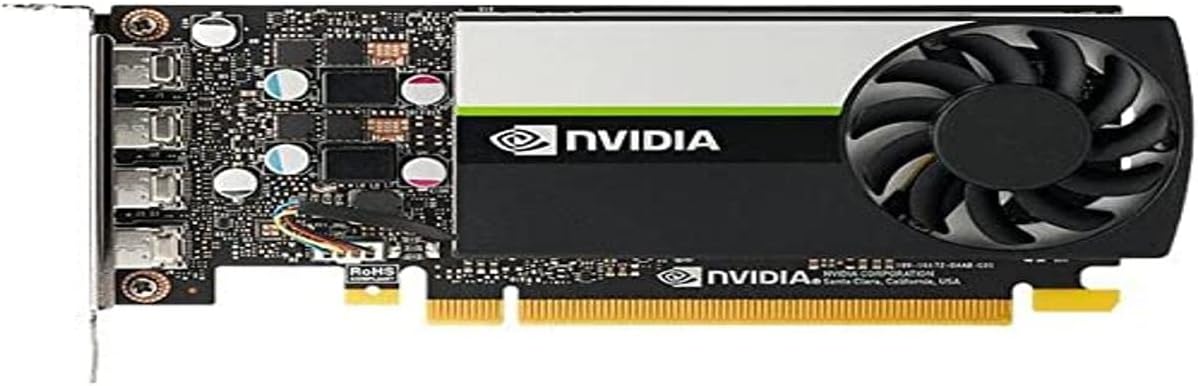
Designed specifically for professional workflows in compact business systems the PNY Nvidia RTX A400 is a single slot low profile card. It holds an impressive rating of 4.7 stars due to its efficiency and compatibility with modern Optiplex models. It delivers exceptional compute power for AI and modeling tasks despite its tiny footprint.
We may earn a commission when you buy through this link, at no additional cost to you.
This card is powered by the Nvidia Ampere architecture which brings advanced features like ray tracing and AI rendering. The 4GB GDDR6 memory supports high speed data transfer ideal for video production and multitasking. It connects to four high resolution displays via Mini DisplayPort 1.4a making it perfect for visualization workflows.
The 50W power consumption ensures reliability and performance without needing extra power connectors. While the 4GB memory might limit ultra high resolution textures it is sufficient for most professional applications. The single slot design keeps the system airflow open for better thermal performance.
This is an excellent budget friendly option for businesses upgrading their workstations. It balances cost and capability well without sacrificing professional standards. We recommend it for users who need reliable performance in a minimal package.
At just 50W it runs cool and requires no additional power connectors for simple installation.
Four Mini DisplayPort outputs allow you to connect multiple high resolution screens easily.
We may earn a commission when you buy through this link, at no additional cost to you.
The ASUS Dual GeForce RTX 3050 brings enhanced streaming multiprocessors with 2X the FP32 throughput for better gaming efficiency. It has a strong rating of 4.7 stars indicating user satisfaction with its durability and performance. The card features 2nd Generation RT Cores and 3rd Generation Tensor Cores for advanced ray tracing.
We may earn a commission when you buy through this link, at no additional cost to you.
Axial-tech fan design uses a smaller hub and longer blades to increase downward air pressure for better cooling. A stainless steel bracket provides corrosion resistance and IP5X dust resistance protects internal components. The OC mode boosts clock speeds to 1500MHz for extra performance headroom.
While it maximizes compatibility it does occupy 2-slot space which might be tight in some Optiplex chassis. However the cooling efficiency often justifies the size trade-off for stable performance. It offers a robust solution for users needing slightly more than basic graphics.
Consider this model if you have an Optiplex with enough clearance for a 2-slot card. It delivers excellent value through its robust build and improved cooling compared to rivals. We suggest it for enthusiasts needing reliable gaming performance in a desktop.
Axial-tech fans with barrier rings increase airflow to keep the GPU cool during long sessions.
IP5X dust resistance and stainless steel brackets ensure the card lasts longer in dusty environments.
We may earn a commission when you buy through this link, at no additional cost to you.
This card is built for entry level tasks with a chipset of NVIDIA GeForce GT 1030 offering stable basic graphics. It rates 4.5 stars for reliability and ease of installation in small chassis. It supports HDCP and DirectX 12 which is sufficient for media playback and light office work.
We may earn a commission when you buy through this link, at no additional cost to you.
The 4GB DDR4 memory runs at a 64-bit interface with a boost clock of 1430 MHz. It includes DisplayPort and HDMI outputs for flexible connectivity. The single fan ensures quiet operation without taking up much space inside your computer case.
DDR4 memory is slower than GDDR6 but acceptable for simple applications. The performance is modest so do not expect high frame rates in heavy games. It is a practical solution for adding display support to systems without dedicated graphics.
Buy this if you need to add a second monitor or upgrade basic video output on a tight budget. It is a hassle free upgrade for older Optiplex models lacking dedicated GPU slots. We recommend it for users needing simple graphics support.
Its low profile design allows for easy insertion into legacy systems without modifying the chassis.
HDCP support ensures you can watch protected content on streaming services without issues.
We may earn a commission when you buy through this link, at no additional cost to you.
The GIGABYTE GeForce RTX 3050 features the WINDFORCE OC V2 design with dual fans for reliable thermal management. It has a solid rating of 4.6 stars for its consistent performance in gaming and general tasks. Powered by GeForce RTX 3050 it integrates modern features for enhanced visual fidelity.
We may earn a commission when you buy through this link, at no additional cost to you.
It includes 2nd Gen RT Cores and 3rd Gen Tensor Cores for AI acceleration and ray tracing. The 6GB GDDR6 memory with 96-bit interface handles textures smoothly. This architecture ensures the card remains relevant for future software updates and games.
While it delivers strong performance users should check if the physical dimensions fit their specific Optiplex model. Dual fans provide better cooling than single fan models but add some bulk. It is a reliable choice for those prioritizing cooling and stability.
Select this card if you need a balance of performance and cooling in a small form factor. It offers excellent value for gaming and multimedia. We recommend it for users needing robust graphics capabilities.
Dual WINDFORCE fans keep temperatures low even during extended use without noise.
Ampere architecture ensures compatibility with the latest games and AI tools.
We may earn a commission when you buy through this link, at no additional cost to you.
This MSI Gaming RTX 3050 LP combines compact design with a boost clock of 1492 MHz for responsive graphics. It holds a rating of 4.5 stars from users who value its stability and performance in gaming. The card uses Ampere Architecture for efficient processing of complex graphics tasks.
We may earn a commission when you buy through this link, at no additional cost to you.
With 6GB GDDR6 memory running at 14 Gbps it provides adequate speed for modern applications. It includes HDMI and DisplayPort outputs for flexible display setup. The low profile design ensures compatibility with small desktop cases common in enterprise environments.
The design is straightforward without flashy features which keeps costs reasonable. It does not require additional power connectors in many cases making installation simple. However the limited ports might restrict multi monitor setups without adapters.
Buy this if you need a reliable low profile card for general purpose use or gaming. It fits well into existing Optiplex chassis without issue. We recommend it for users needing a direct upgrade path.
Designed to fit in small form factor cases ensuring it works with most Optiplex models.
Ampere architecture provides better power efficiency for sustained workloads.
We may earn a commission when you buy through this link, at no additional cost to you.
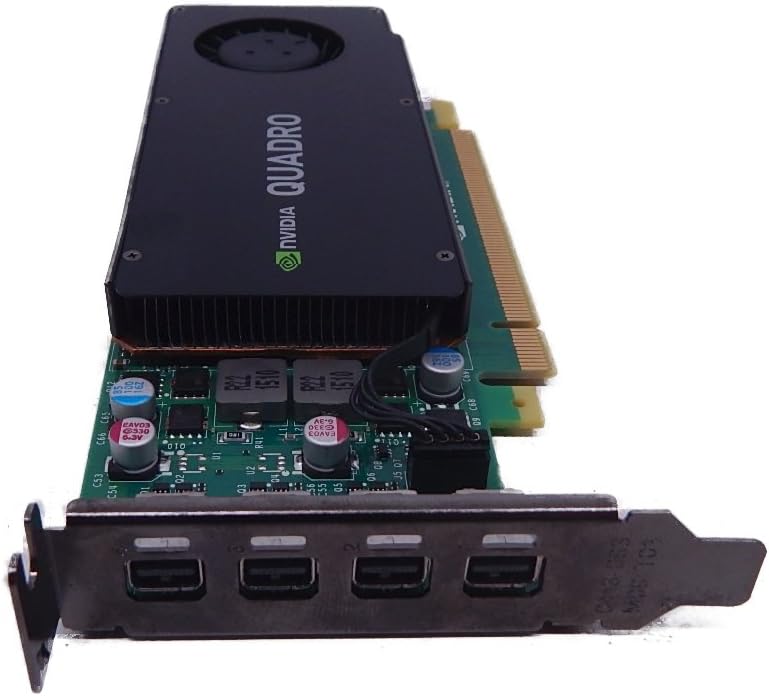
The PNY NVidia Quadro K1200 offers incredible 3D application performance in a compact footprint ideal for legacy systems. It has a rating of 4.4 stars due to its stability and professional features. It includes four Mini DisplayPort 1.2 connectors for multi monitor setups.
We may earn a commission when you buy through this link, at no additional cost to you.
Certified for professional apps it ensures reliability in work environments. The low profile design allows it to fit in small chassis easily. A 3-Year Warranty adds to its value for business users seeking longevity.
Technology here is older with PCIe 2.0 support which limits bandwidth. While sufficient for CAD and modeling it may struggle with modern gaming. It is best for specialized industrial or legacy applications.
Choose this if you have legacy software needs or limited power supplies. It provides professional reliability for a low price. We recommend it for specific enterprise upgrades.
Quadro certification ensures stable performance in professional software suites.
Four Mini DisplayPort connectors allow for expanded visual workspace without adapters.
We may earn a commission when you buy through this link, at no additional cost to you.
The NVIDIA Quadro P1000 combines the latest GPU architecture and display technologies for efficient workstation use. It rates 4.5 stars for stability and performance in small form factors. The card delivers up to 60% better performance than previous generation options.
We may earn a commission when you buy through this link, at no additional cost to you.
Powered by NVIDIA Quadro Pascal GPU technology it is certified for professional applications. With 4GB GDDR5 memory it handles moderate complexity well. It supports 4K and 5K displays for high detail visualizations.
It is more powerful than entry level options but still low profile. The 4GB VRAM is sufficient for many design tasks but not high end rendering. It offers excellent value for basic professional work.
Select this if you need professional features without high power demands. It fits well in small Optiplex systems. We recommend it for mid range workstation upgrades.
Support for 4K and 5K displays ensures your designs look sharp on modern monitors.
Low profile design ensures efficient power use while maintaining professional stability.
We may earn a commission when you buy through this link, at no additional cost to you.
This NVIDIA Graphics Card is designed for legacy systems requiring DVI outputs with Quadro stability. It holds a rating of 4.2 stars for basic professional tasks. It uses a Quadro K1200 engine with 4GB GDDR5 memory for smooth data transfer.
We may earn a commission when you buy through this link, at no additional cost to you.
It is compatible with PCIe 2.0 x16 slots making it easy to install. The card maintains Quadro reliability for professional work. However it lacks modern high speed ports which may limit use.
The DVI interface is a niche feature that remains necessary for some older monitors. Performance is adequate for CAD but not for modern gaming. It fills a specific gap for legacy hardware users.
Buy this if you need to support older DVI monitors professionally. It is a practical choice for legacy upgrades. We recommend it for those needing specific legacy ports.
DVI output ensures compatibility with older monitors that lack modern digital ports.
Quadro K1200 provides certified stability for specific legacy professional applications.
We may earn a commission when you buy through this link, at no additional cost to you.
Selecting the right graphics card for an Optiplex system requires careful attention to physical dimensions and power requirements. This section outlines the critical factors you should consider before making a purchase.
The most critical constraint is the physical size of the GPU. Optiplex machines often have limited internal space requiring low profile or slim profile cards to fit properly. Always measure your case dimensions and compare them to the card's height and length before buying.
Ensure the card is explicitly marked as Low Profile or SFF to avoid installation issues.
Many Optiplex systems come with low wattage power supplies that cannot support high-end gaming cards. Look for GPUs that run on the PCIe slot power alone or have low TDP ratings around 50W to 75W.
Check your power supply unit (PSU) wattage to ensure it can handle the new graphics card load.
Consider how many monitors you need to connect and what types of ports are required. Modern cards often include HDMI 2.1 or DisplayPort 1.4a for high resolution outputs like 4K or 8K.
Verify that the card has the correct number and type of ports for your setup needs.
Newer architectures like Ampere or Turing offer better efficiency and features such as ray tracing or AI acceleration. These are beneficial for gaming or creative workflows that require modern processing power.
Older architectures may suffice for basic office tasks but lack advanced graphical capabilities.
Graphics memory (VRAM) impacts performance in tasks involving high resolution textures or multiple displays. GDDR6 memory is faster than DDR4 or GDDR5 and should be preferred for future proofing.
Look for at least 4GB or 6GB of VRAM depending on your workload requirements.
If you use professional design software check for ISV certification to ensure stability. Quadro or RTX A-series cards often provide this certification compared to gaming cards.
Certified cards reduce the risk of crashes during critical professional tasks.
Small cases can trap heat so efficient cooling is vital for long term reliability. Passive cards rely on case airflow while active cards with fans provide better self-contained cooling.
Choose active cooling if your system does not have strong internal fans.
A longer warranty period indicates confidence in the product quality and gives peace of mind. Some professional cards come with 3-year warranties compared to shorter terms for consumer hardware.
Prioritize brands that offer reliable customer support for hardware issues.
Before installing your new graphics card ensure the system is powered down and unplugged. Remove the side panel of your Optiplex and locate the PCIe slot. Carefully align the card with the slot and press down gently until it clicks into place.
Once the card is installed reconnect the power and boot the system to install the latest drivers from the manufacturer. Visit the official website to download software optimized for your specific card model for best performance.
Regularly clean dust from the card and internal components using compressed air. Keep the system in a well ventilated area to prevent overheating. Monitoring software can help track temperatures and ensure the system runs smoothly over time.
Not every GPU fits due to space constraints. You must choose a low profile or slim card to match the case dimensions. Always check the height of the card before purchasing to ensure it fits in your Optiplex chassis.
Most low profile cards for Optiplex draw power directly from the motherboard slot. However check the wattage of your existing power supply to ensure it can handle the load if the card requires more.
Quadro or RTX A-series cards are certified for CAD applications. They provide stability and better support for professional software compared to gaming cards.
Yes most cards in this list support 4K resolution. Check the specific ports like HDMI or DisplayPort to ensure they can drive your monitor at the desired resolution and refresh rate.
While primarily designed for professional work it can handle light gaming. It is not as powerful as dedicated gaming cards but sufficient for casual titles.
Sometimes updating the BIOS ensures compatibility with newer hardware. Check the Dell support site for your specific Optiplex model before installing a new GPU.
RTX focuses on gaming with DLSS and ray tracing while Quadro is certified for professional applications. Choose based on your primary workload needs.
Yes most modern GPUs support Windows 11. Ensure drivers are updated after installation to maintain system stability and security.
We have reviewed ten top options for upgrading Optiplex systems with graphics cards. The PNY RTX A400 stands out for budget professional needs while the maxsun RTX 3050 offers great gaming performance.
Prioritize physical fit and power constraints when making your choice. Ensure the card matches your case size and power supply capacity to avoid installation issues.
Check current listings for pricing and availability as markets change frequently. Selecting the right card will significantly improve your system capabilities for work or entertainment.