
TaleBot Pro Coding Robot
4.7Editor score
Screen-free interactive learning
Voice feedback and storytelling
Compatible with Lego blocks
This guide compares the top 10 coding toys for kids in October 2026, evaluating STEM value, screen-free options, and educational benefits for young learners.
Coding toys offer a hands-on way for children to learn programming logic without staring at screens. These kits introduce sequencing, loops, and problem-solving through playful interaction and tangible feedback.
We compared ten leading products based on educational value, ease of use, and engagement. Each pick supports different age groups and skill levels, from preschoolers to early teens.
Every recommendation highlights unique strengths and ideal use cases. Prices and availability change frequently so please check current listings before purchasing your next STEM gift.
4.7Editor score
4.6Editor score

4.6Editor score
The following table presents a side-by-side comparison of all ten products. Review key specifications and features to find the perfect coding toy for your child.




The Thames & Kosmos My Robotic Pet is a standout educational tool for kids aged eight and up. It combines physical construction with screen-free programming logic through action cards.
We may earn a commission when you buy through this link, at no additional cost to you.
This kit allows children to build a realistic robotic chameleon that reacts to touch and color inputs. The manual guides users through assembly and explains how nature inspires engineering solutions.
While the build process takes time and supervision, the result is a durable toy that teaches mechanical and coding principles. Some users may find the cost higher than simpler coding mice.
Parents seeking a deep STEM experience will appreciate this set. It is ideal for children ready for complex assembly and logical sequencing without relying on tablets.
The articulated joints and realistic movements simulate actual robotic engineering for hands-on learning.
Physical colored cards allow kids to program behaviors without any digital interface or software.
We may earn a commission when you buy through this link, at no additional cost to you.
The Makeblock mBot is designed to introduce children aged eight to twelve to electronics and robotics. It supports both Scratch and Arduino programming for growing skills.
We may earn a commission when you buy through this link, at no additional cost to you.
Kids can build the robot in minutes and then control it via remote or software. The platform allows for extensive customization through add-on modules and LEGO compatibility.
Some users note that batteries are not included and software setup is necessary. However, the open-source nature provides long-term value as coding abilities improve.
This kit suits families wanting a bridge between simple toys and serious robotics. It is an excellent choice for aspiring engineers ready to explore hardware and code.
Children can start with visual coding blocks and advance to text-based languages as they grow.
The system connects with hundreds of electronic modules for endless project possibilities.
We may earn a commission when you buy through this link, at no additional cost to you.
The Sphero Mini is a tiny programmable robot ball that offers big fun in a small package. It connects via Bluetooth to mobile devices for easy coding.
We may earn a commission when you buy through this link, at no additional cost to you.
Kids can draw paths, use drag-and-drop blocks, or write JavaScript to control the ball. It also includes cones and pins for obstacle course challenges right out of the box.
While the app is required for full functionality, the variety of coding methods supports different learning styles. Battery life is limited to about one hour per charge.
This robot is perfect for kids who want to code on the go. It is a fun way to introduce programming concepts through gaming and physical play.
The ball doubles as a controller for arcade-style games in the dedicated app.
Built-in gyroscope and accelerometer allow for advanced motion and tilt controls.
We may earn a commission when you buy through this link, at no additional cost to you.
This set is designed for children as young as four to learn sequencing and logic without screens. It uses simple buttons and coding cards to program the mouse.
We may earn a commission when you buy through this link, at no additional cost to you.
The kit includes plenty of walls and tunnels to build custom challenges. It is durable and ideal for classroom rotations or small group activities.
Some users may need to purchase AAA batteries separately. The grid size is fixed at twenty inches which limits complex mazes for older kids.
Parents and teachers will find this set reliable for teaching early programming basics. It builds confidence through trial and error with immediate physical results.
Children learn to plan steps ahead to navigate the mouse through obstacles.
Cards represent commands like move forward or turn left for tangible programming.
We may earn a commission when you buy through this link, at no additional cost to you.
The Mech-5 is a mechanical coding robot that requires kids to build the device before using it. It is designed for future engineers aged ten and older.
We may earn a commission when you buy through this link, at no additional cost to you.
Once built, the robot can throw, lift, and kick using coded commands. The coding wheel allows for easy sequence creation without complex screens.
The build process takes several hours which tests patience and attention to detail. This depth makes it a rewarding project for dedicated young creators.
This kit is perfect for children interested in how things work. It provides a true STEM experience that blends construction with basic coding concepts.
Coding buttons snap onto a wheel to trigger specific mechanical actions.
Step-by-step instructions ensure proper construction for optimal robot performance.
We may earn a commission when you buy through this link, at no additional cost to you.
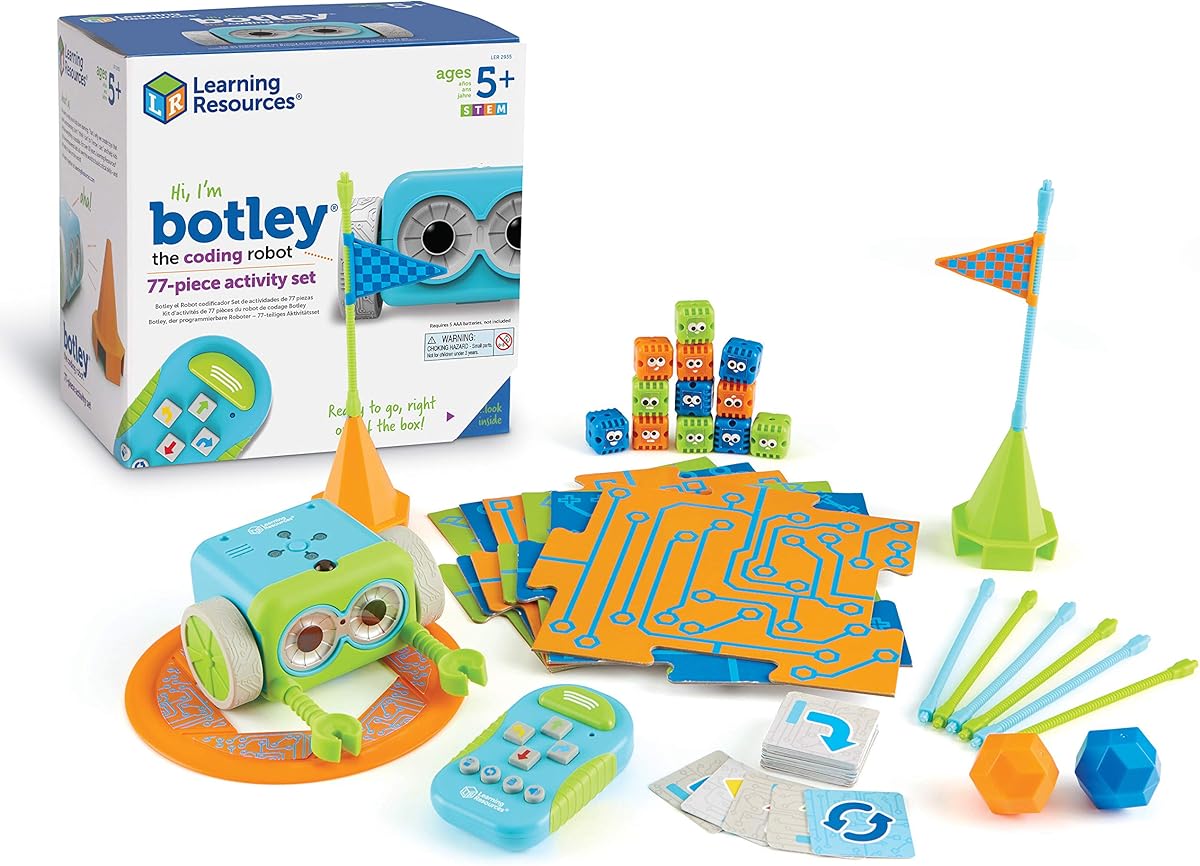
Botley offers completely screen-free coding for children aged five and up. The robot comes ready to code right out of the box with a remote programmer.
We may earn a commission when you buy through this link, at no additional cost to you.
It features object detection to avoid obstacles and supports looping commands for advanced logic. The seventy-seven-piece set provides plenty of tiles and obstacles for play.
Users must ensure they have batteries for both the robot and remote. The remote programmer takes a moment to master but simplifies the coding process significantly.
This set is an excellent choice for families avoiding screens. It teaches critical thinking and planning through tactile interaction and creative problem-solving.
The robot senses objects in front of it and automatically avoids collisions.
Kids can program repeating sequences to solve complex maze challenges.
We may earn a commission when you buy through this link, at no additional cost to you.
The Ozobot Evo Entry Kit bridges offline drawing and online coding seamlessly. It is designed for grades K through 12 and grows with the child's abilities.
We may earn a commission when you buy through this link, at no additional cost to you.
Students can draw color codes for screen-free play or use Blockly for advanced online programming. The kit includes over seven hundred free lessons for comprehensive learning.
While the price is higher than other options, the educational depth justifies the cost. Users must purchase color markers to enable the screen-free coding mode.
This kit is ideal for schools and serious homeschoolers. It offers a robust curriculum that supports both beginners and advanced coders effectively.
Kids draw colored lines on paper for the robot to read and follow.
Access to hundreds of lessons ensures long-term educational value and engagement.
We may earn a commission when you buy through this link, at no additional cost to you.
Botley 2.0 builds on the original with improved object sensing and lights. It introduces early coding ideas through playful cause-and-effect actions.
We may earn a commission when you buy through this link, at no additional cost to you.
This version supports multi-step paths and 45-degree turns for more complex challenges. The kit includes seventy-eight pieces for extensive maze creation and storytelling.
Users must have batteries available for immediate play. The learning curve is gentle but offers depth as kids master new features over time.
This updated set is perfect for those who want more than basic movement. It encourages refinement of strategies and longer coding paths.
Lights and sounds make coding responses immediate and exciting for kids.
Support for 45-degree turns allows for more precise maze navigation.
We may earn a commission when you buy through this link, at no additional cost to you.
The Dash robot is designed for kids aged six to eleven and requires no assembly. It is ready to provide a STEM advantage right out of the box.
We may earn a commission when you buy through this link, at no additional cost to you.
Dash can sing, dance, and respond to voice commands via compatible apps. It offers five different apps to teach concepts like sequencing and variables.
While it depends on mobile devices for coding, the setup is instant and user-friendly. Battery life supports up to five hours of active play for extended sessions.
This robot is great for families who want immediate engagement. It is widely used in schools globally to teach STEM skills effectively.
Kids can program Dash to respond to voice commands for interactive play.
Multiple apps provide varied coding challenges to match skill levels.
We may earn a commission when you buy through this link, at no additional cost to you.
TaleBot Pro is designed for toddlers and preschoolers aged three to five. It provides interactive map play and voice feedback for an engaging learning environment.
We may earn a commission when you buy through this link, at no additional cost to you.
Kids can record their own stories and use touch-based controls to make the robot move. It supports up to 256 commands including loops and sequences.
The price point is lower than advanced kits making it accessible for budget-conscious families. However, it focuses on early concepts rather than complex programming.
This toy is ideal for introducing very young children to basic coding logic. It fosters creativity through storytelling and simple interactive commands.
Children can record their voices and hear them play back from the robot.
Simple buttons on the robot make it easy for little hands to operate.
We may earn a commission when you buy through this link, at no additional cost to you.
Selecting the right coding toy requires considering age, screen preferences, and learning goals. The factors below will help you make an informed choice.
Coding toys are designed for specific age ranges to ensure the concepts are neither too simple nor too difficult. Younger children need tactile buttons and simple sequences while older kids can handle complex software.
Choose a toy that matches your child's current developmental stage to maintain engagement and confidence.
Some parents prefer screen-free options to limit device usage while others want app integration for advanced features. Screen-free toys use physical cards or buttons whereas app-based ones use tablets.
Decide based on your family's screen time rules and whether you want digital flexibility or purely physical play.
Look for toys that teach specific programming concepts like sequencing loops and conditionals. The best kits also teach engineering principles and logical problem solving skills.
Prioritize products with structured lessons or guides that grow with your child's skills over time.
Some robots allow you to add accessories or connect to other modules. This feature keeps the toy relevant as your child learns new skills.
Check if the system supports add-ons or compatibility with other building sets like LEGO.
Coding toys often involve moving parts and frequent handling. Durable materials ensure the toy withstands regular play without breaking.
Invest in robust kits especially if multiple children will use the product regularly.
Building robots can be a learning activity in itself but requires time and patience. Pre-assembled toys offer instant play whereas building kits teach construction skills.
Consider how much time you are willing to spend on setup before coding begins.
Many coding robots require batteries which can be an ongoing cost. Check if batteries are included and how long they last during play.
Rechargeable options may save money in the long run but have initial higher costs.
Coding toys range from affordable options to premium kits with extensive curriculum. Your budget should align with the longevity and depth of the educational experience.
Set a realistic budget and compare features to ensure you get the best value for your needs.
Start by reading the included guide thoroughly to understand the basic commands and setup requirements for your specific robot.
Always store coding cards and small pieces in a container to prevent loss and keep the play area organized.
Replace batteries promptly when the robot slows down to maintain performance and avoid leakage issues inside the device.
Yes many coding toys are designed specifically for beginners with simple interfaces and guided lessons. These sets introduce core concepts without requiring prior knowledge of programming languages.
Some toys function offline using physical cards while others need internet for app updates or online coding environments. Check the product specifications to confirm connectivity needs.
Absolutely many toys introduce concepts like loops and variables that translate to real coding. Advanced kits even support languages like JavaScript or Python.
Choose toys rated for your child's age to ensure safety. Smaller parts can be choking hazards for very young children so supervision is recommended.
Quality coding toys can last years if cared for properly. Durable materials and replaceable batteries help extend the lifespan of these educational tools.
Rotating different coding challenges or projects keeps play fresh. Many kits offer new activities online to help maintain long-term interest.
Many sets are designed for group play allowing children to collaborate on projects. This encourages teamwork and social problem solving skills.
Most toys include clear instructions so parents do not need technical expertise. However having some basic computer knowledge can help resolve setup issues.
We explored ten top coding toys ranging from budget-friendly sets to premium kits. Each offers unique strengths for different ages and learning goals.
Prioritize screen-free options if you want to minimize device usage or choose app-enabled toys for advanced coding paths.
Always verify current availability and pricing before purchase to ensure you get the best deal for your chosen STEM gift.