
Creality Laser Engraver Enclosure 2.0
4.4Editor score
Compatible with 95 percent of machines
Foldable assembly for easy storage
Flame-retardant fabric construction
Finding the right laser engraver enclosure is essential for maintaining a safe and clean workspace. These protective units help contain smoke, dust, and noise while allowing you to monitor your projects easily.
We evaluated ten popular models based on compatibility, ventilation quality, and build durability. Our comparison highlights key features that matter most for hobbyists and professional makers alike.
Each pick below showcases distinct strengths and trade-offs to help you choose wisely. Keep in mind that product availability and details may change over time as manufacturers update their lines.
4.4Editor score
4.2Editor score

4.4Editor score
As an Amazon Associate we earn from qualifying purchases.
This table provides a side-by-side overview of the top ten laser engraver enclosure models available today. Each entry highlights essential specifications to help you quickly compare dimensions, materials, and included accessories.


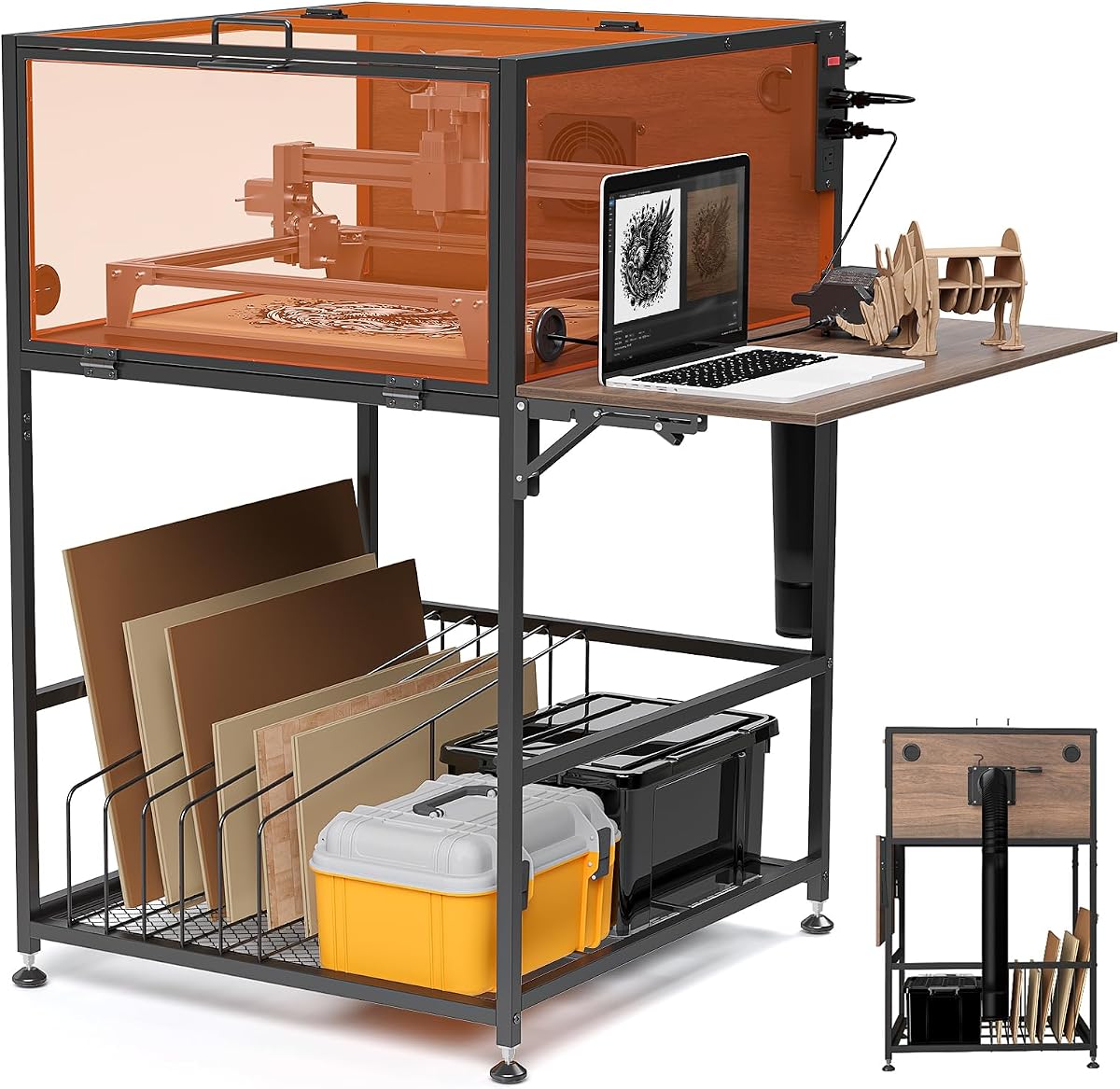
The Crafit Laser Engraver Enclosure Cabinet stands out as a robust solution for makers seeking comprehensive protection and organization. With a solid 4.2 rating, users appreciate its spacious interior that accommodates most laser engravers while keeping smoke and dust contained effectively.
We may earn a commission when you buy through this link, at no additional cost to you.
Its heavy-duty enclosure helps contain sparks and splashes, making it safer for indoor use. The 20W ventilation fan and flexible exhaust pipe actively remove odors, keeping your workspace fresher during extended sessions. Additionally, the built-in power strip simplifies setup by allowing you to power the engraver, fan, and laptop from one switch.
While the metal frame ensures stability, it does add some weight to the unit. The assembly process is straightforward but may require a bit of patience. These trade-offs are acceptable given the enhanced safety and storage features it offers for serious crafters.
This enclosure is ideal for users who prioritize a tidy and safe workspace. If you need a cabinet that combines ventilation, storage, and easy power management, the Crafit model delivers strong value and reliability for your laser projects.
The high-efficiency ventilation fan and exhaust pipe actively remove smoke and particles, ensuring better indoor air quality during operation.
Bottom storage with dividers keeps wood sheets upright and essentials handy, while the power strip consolidates your electrical needs.
We may earn a commission when you buy through this link, at no additional cost to you.
The Creality Laser Engraver Enclosure 2.0 offers an excellent entry point for hobbyists looking for safety without breaking the bank. Its 4.4 rating reflects strong user satisfaction with its universal fit and practical ventilation features that keep smoke under control.
We may earn a commission when you buy through this link, at no additional cost to you.
This protective cover features a spacious design compatible with most machines on the market, including the Creality Falcon series. The dual-window design with blue light-blocking material protects your eyes while allowing real-time observation of the engraving process. The 4000 RPM fan efficiently extracts smoke and odors, maintaining a fresher workspace.
As a fabric-based enclosure, it may not feel as sturdy as hard-shell options, but it is lightweight and foldable for easy storage. The flame-retardant material adds a layer of safety that is crucial for laser work. Some users might find the fan requires periodic cleaning to maintain peak performance.
If you are new to laser engraving or have limited space, this model is a smart choice. It balances cost, functionality, and safety effectively, making it a top pick for budget-conscious makers who still want reliable protection.
With a design that fits 95 percent of laser engravers, this enclosure adapts to various machines including Creality Falcon and others.
The blue light-blocking windows protect your vision, while the high-speed fan removes harmful smoke and odors during operation.
We may earn a commission when you buy through this link, at no additional cost to you.
The Laser Engraver Integrated Enclosure with LED Light brings premium touches to the table, focusing on enhanced visibility and smoke containment. With a 4.4 rating, users value the integrated LED strip that brightens the workspace and the upgraded materials that boost stability.
We may earn a commission when you buy through this link, at no additional cost to you.
Its updated bottom design completely seals the bottom, preventing smoke from escaping and collecting debris efficiently. The LED light strip provides sufficient brightness to observe carving details without external lighting. The exhaust pipe uses three-layer composite materials to reduce smoke adsorption and lingering odors significantly.
While it costs slightly more than basic fabric covers, the added features justify the investment for users who need consistent visibility and air quality. Assembly is foldable but the instructions could be more detailed for first-timers. These minor drawbacks are outweighed by the performance benefits.
This enclosure is perfect for makers who want a professional-grade setup with built-in lighting and superior ventilation. If you prioritize clarity during engraving and effective smoke management, this model stands out as a top-tier option.
The updated bottom design fully seals the enclosure, stopping smoke from escaping and keeping your room cleaner.
The LED light strip offers consistent brightness to monitor your project closely, reducing eye strain during long sessions.
We may earn a commission when you buy through this link, at no additional cost to you.
The Laser Engraver Enclosure in Green Acrylic provides a solid, rigid structure for those who prefer hard-shell protection over fabric tents. While it lacks a numeric rating, its design focuses on stability and durability using thickened acrylic and aluminum components.
We may earn a commission when you buy through this link, at no additional cost to you.
Built with a black aluminum alloy frame and thickened acrylic panels, this enclosure offers a stable structure for desktop engraving. The green acrylic helps reduce smoke diffusion and debris splashing while maintaining visibility. The front hinged door with a magnetic stop simplifies access and keeps the workspace clean.
The rigid nature of this unit means it does not fold for storage like fabric options, which could be a limitation for smaller shops. Additionally, the specific dimensions require careful verification to ensure your machine fits. However, the build quality and ease of access make it a reliable choice.
This enclosure suits users who value durability and a permanent setup. If you need a sturdy barrier that keeps dust and smoke contained without worrying about fabric wear, this acrylic model is worth considering.
The aluminum alloy frame and connectors provide a stable structure that resists warping over time.
The front hinged door with a magnetic stop allows easy opening and secure closure for quick material changes.
We may earn a commission when you buy through this link, at no additional cost to you.
The Creality Laser Engraver Enclosure 2.0 with Vent emphasizes noise reduction and air quality. With a 4.2 rating, it appeals to users who work in shared spaces and need to minimize disturbance from cooling fans and machinery.
We may earn a commission when you buy through this link, at no additional cost to you.
Its spacious design fits 95 percent of laser engravers on the market, ensuring broad compatibility. The transparent visible design filters blue light to protect your eyes while allowing real-time observation. The built-in smoke ventilation system helps expel dust and smoke to keep the internal air clean.
While it lacks the high RPM fan of other models, its focus on noise cancellation is a unique advantage. Installation takes only a few steps, and the foldable design saves space when not in use. The lack of internal storage is a minor limitation but acceptable for the size.
This model is ideal for those prioritizing a quieter workspace. If noise from your engraver is a concern, this enclosure offers a practical solution with effective smoke and noise isolation.
The enclosure significantly reduces noise from laser engraver cooling fans, making it easier to work in quiet environments.
It takes a few steps to install and folds for storage, making it convenient for small studios.
We may earn a commission when you buy through this link, at no additional cost to you.
The LONGER Laser Engraver Large Size Enclosure offers generous dimensions for users with larger machines or complex projects. Its 4.4 rating reflects satisfaction with its space and durability, making it a strong contender for serious makers.
We may earn a commission when you buy through this link, at no additional cost to you.
Measuring 31 by 28.7 by 20.8 inches, it accommodates most laser engraving machines including the Longer B1 series. The large transparent design allows real-time monitoring of your work. Built-in smoking fan ensures air circulates freely, maintaining cooling and odor removal.
Constructed from premium fire-retardant materials, this housing is durable and easy to clean. However, the larger size means it requires more desk space, which might be a constraint in smaller workshops. Assembly involves more parts but provides a sturdy result.
This enclosure is best for those who need extra room for rotation or bigger materials. If space allows, its size and build quality make it a reliable choice for long-term use.
The large space provides room for rotary rollers and larger materials, accommodating bigger engraving needs effectively.
Fire-retardant properties and durable construction protect your machine from hazards while ensuring longevity.
We may earn a commission when you buy through this link, at no additional cost to you.
The Creality Laser Engraver Cover V2.0 represents an upgraded version with improved ventilation and stability. Its high 4.5 rating indicates strong user approval for its enhanced fan speed and robust construction.
We may earn a commission when you buy through this link, at no additional cost to you.
This cover includes metal support rods that make the structure more reliable and firm. The fan speed is increased to 4000 RPM to extract smoke more effectively. The dual-view window design protects eyes while allowing easy observation of the engraving process.
The higher size allows for the installation of a rotary roller, expanding its functionality. However, the dimensions are similar to other models so check fit before purchasing. Setup is foldable but requires careful attention to ensure stability.
This cover is ideal for users seeking an improved fan and structural upgrades. If you need better smoke extraction and stability, the V2.0 model offers these key enhancements over earlier versions.
The 4000 RPM fan extracts smoke and odors quickly, keeping the indoor air fresh and clean during operation.
The higher profile accommodates rotary rollers, allowing you to engrave cylindrical items easily.
We may earn a commission when you buy through this link, at no additional cost to you.
The Creality Laser Engraver Enclosure Fireproof is designed with safety as a priority, featuring materials that resist fire and dust. Its 4.5 rating reflects trust in its protective capabilities and effective smoke management.
We may earn a commission when you buy through this link, at no additional cost to you.
Compatible with most engraving machines including Xtool and Creality, it offers a spacious design. The enclosed design isolates noise, fire, smoke, and odors effectively. The large viewing window allows real-time observation of the engraving progress.
Users should note that pipe connections need to be tightened carefully during installation to prevent pressure issues. While the design is robust, care must be taken with support rods. These minor assembly considerations do not detract from its safety performance.
This enclosure is perfect for those prioritizing fire safety and smoke control. If you need a reliable cover that isolates hazards while maintaining visibility, this model is a top recommendation.
The enclosed design prevents smoke and fire hazards from spreading, ensuring a safer environment.
The large transparent window lets you monitor your project without exposure to blue light or smoke.
We may earn a commission when you buy through this link, at no additional cost to you.
The Creality Laser Engraver Enclosure Isolate Smoke focuses on keeping harmful elements out of your living space. Its 4.5 rating highlights user satisfaction with its ability to contain smoke and odors while remaining user-friendly.
We may earn a commission when you buy through this link, at no additional cost to you.
Made of high-quality flame retardant material capable of withstanding 1000C, it prevents burning risks. The large viewing design filters blue light for eye protection. The included exhaust fan helps expel smoke quickly to maintain clean internal air.
It is easy to install without extra tools and folds for storage, saving space in small studios. However, it lacks the advanced features of premium models like integrated lighting or power strips. For basic smoke isolation, it performs very well.
This enclosure is ideal for users needing a straightforward, effective solution. If you prioritize safety and easy setup, this model delivers reliable performance at a competitive value.
The flame retardant material withstands up to 1000 degrees Celsius, offering superior fire protection.
Installation requires no tools and takes only a few steps, making it beginner-friendly.
We may earn a commission when you buy through this link, at no additional cost to you.
The VEVOR Laser Engraver Enclosure offers a large space with flexible exhaust options. With a 4.1 rating, it serves well for users needing adaptable ventilation and ample room for projects.
We may earn a commission when you buy through this link, at no additional cost to you.
The fully enclosed design ensures no smoke leakage while the 4000 RPM fan effectively eradicates smoke and noise. Exhaust ports on both sides allow flexible placement for your workspace. A 19.69 inch fastener strip on each side offers storage for tools.
While it has a slightly lower rating than top competitors, its size and storage features are strong selling points. It folds quickly for transport, making it ideal for portable setups. Some users report build quality variance but overall it performs well.
This enclosure is best for those who need large capacity and tool storage. If you want a versatile option that adapts to your layout, this model offers good utility and capacity.
Exhaust ports on both sides let you position the fan where it fits your workspace best.
The 19.69 inch fastener strip on each side holds tools securely, keeping your workspace organized.
We may earn a commission when you buy through this link, at no additional cost to you.
Selecting the right laser engraver enclosure requires careful consideration of your workspace, machine size, and safety needs. Here are the key factors to evaluate before making a purchase.
Ensure the enclosure is large enough to fit your laser machine comfortably. Measure your device including any rotary attachments and compare with the internal dimensions provided by the manufacturer. An ill-fitting cover may block airflow or prevent access to buttons.
Always verify compatibility with your specific model before buying to avoid returns and frustration.
Look for enclosures that include a powerful exhaust fan and pipe to remove smoke effectively. A 4000 RPM fan is often recommended for better air circulation and odor control. Poor ventilation can lead to lingering smells and health issues over time.
Prioritize models with strong fans and well-designed exhaust ports for the cleanest air quality.
Choose materials that are flame retardant or fireproof to minimize risk during operation. High-quality fabrics or acrylics rated for high temperatures provide better protection. This is critical for ensuring safety in indoor environments.
Check for official fire safety ratings on the materials to ensure they meet your safety standards.
A good enclosure should feature windows that filter harmful blue light while allowing you to monitor the engraving process. Semi-transparent or tinted panels can reduce glare and eye strain. This feature makes long sessions safer and more comfortable.
Select a model with light-filtering viewing windows to protect your eyes without blocking your view.
Some enclosures come with built-in storage like bottom racks or side strips for tools. This helps keep your workspace tidy and accessories handy. Integrated power strips can also reduce cable clutter and simplify setup.
Consider models that offer extra storage options to maximize your workspace efficiency.
If you have limited space, look for foldable designs that allow easy storage when not in use. Lightweight materials make transport easier for users who move their equipment frequently. However, ensure foldable units remain sturdy during operation.
Balance the need for portability with structural stability to ensure safe daily use.
Easy assembly with clear instructions and included hardware saves time and effort. Some models require tools while others are tool-free. Also consider how easy it is to clean and maintain the enclosure for long-term use.
Choose an enclosure with a simple setup and cleaning process to minimize hassle and maximize uptime.
Enclosures range from simple fabric covers to premium hard-shell cases. Determine what features are essential for your use case to stay within budget. Higher prices often reflect better materials and more comprehensive ventilation systems.
Compare features against cost to find the best value for your specific engraving needs.
Place the enclosure on a flat, stable surface near a power outlet. Ensure there is enough clearance around the vents for airflow. Securely connect the exhaust pipe to the fan and vent it outside or to a filtration system as recommended.
Turn on the ventilation fan before starting the engraver to pre-clear the air. Monitor the process through the viewing windows and adjust the fan speed if needed. Always keep the exhaust pipe unobstructed to prevent back-pressure.
Regularly clean the interior and exterior of the enclosure to remove dust and residue. Check the exhaust pipe for clogs and clean the fan blades to maintain efficiency. Fold the unit gently if storing it to avoid damaging support rods or joints.
Yes, an enclosure helps contain smoke, dust, and sparks while reducing noise. It protects your workspace and improves safety by preventing harmful particles from spreading. It also makes it easier to monitor your engraving projects without exposure.
Connect the pipe to the enclosure's exhaust port and seal joints with tape. Run the other end outside or to a ventilation system. Ensure the connection is tight to prevent smoke leaks and maximize extraction efficiency.
Yes, but you should vent the smoke outside or use a high-efficiency filter. Apartments often have limited ventilation so keeping air fresh is important. Check with your building management before modifying ventilation systems.
Many models are made with flame-retardant materials that resist fire but they are not fully fireproof. They are designed to slow fire spread and contain sparks. Always use caution and keep a fire extinguisher nearby for safety.
Some models significantly reduce noise by isolating the machine. Fabric enclosures may muffle sound more than hard-shell cases. If noise reduction is a priority look for units designed specifically for this purpose.
Wipe the interior with a damp cloth to remove dust and debris. Clean the exhaust fan and pipe periodically to maintain airflow. Avoid harsh chemicals that may damage the enclosure's material or coating.
We reviewed ten top laser engraver enclosures offering options for every need from budget to premium. Each model balances safety ventilation and design to protect your workspace and improve engraving quality.
When choosing prioritize the features that matter most such as smoke extraction eye protection and ease of use. The best enclosure will fit your machine perfectly while keeping your indoor air clean and safe.
Prices and availability may change over time so check current listings before purchasing. We hope this guide helps you find the ideal enclosure for your creative projects and safe workspace.