
TECKNET Wired Keyboard
4.5Editor score
7-Color RGB lighting
Spill-resistant design
Lifetime warranty
This guide compares the top backlit illuminated keyboard models for visibility and comfort, reviewing features like LED brightness, key layout, and durability.
Finding a backlit illuminated keyboard can transform your computing experience by enhancing visibility in low-light environments. These devices offer essential lighting features that help users type accurately without straining their eyes during evening sessions or dimly lit offices.
We evaluated ten standout models based on illumination quality, key responsiveness, and ergonomic design. Our comparison focuses on how each keyboard handles backlighting modes, connectivity options, and overall build quality to ensure you find the right fit for your workflow.
Each pick highlights specific strengths like large print options or silent typing mechanisms. While prices may fluctuate over time, these selections represent reliable choices for students, professionals, and seniors seeking clear, comfortable typing experiences.
4.5Editor score

4.9Editor score

4.1Editor score
This side-by-side comparison highlights key specifications across all ten models to help you decide quickly based on your specific needs for visibility, noise levels, and connectivity options.





The TECURS Large Print Backlit Keyboard stands out with its impressive 4.9 rating, offering a comfortable typing experience for users who need clear visibility. Its large font keys and even backlighting make it a top choice for seniors and low-vision users alike.
We may earn a commission when you buy through this link, at no additional cost to you.
This keyboard features a versatile 2-in-1 USB Type-C connector ensuring compatibility with modern devices while maintaining plug-and-play simplicity. The dedicated multimedia keys allow quick control over media functions, enhancing productivity during daily tasks.
Although the backlight is bright and evenly distributed, users should note that Mac systems may have limited multimedia key functionality. The silent membrane structure reduces noise, making it suitable for shared office spaces.
Anyone seeking a reliable, easy-to-read keyboard with adjustable lighting should consider this model. Its ergonomic design and durable build quality ensure long-term comfort and value for home or office environments.
The oversized letters are four times larger than standard, making them easy to read without strain.
Soft membrane keys reduce typing noise significantly, perfect for quiet environments.
We may earn a commission when you buy through this link, at no additional cost to you.
TECKNET delivers a budget-friendly option without compromising on features, offering a full-size layout with customizable RGB lighting. Its silent typing mechanism and sturdy build make it ideal for everyday use.
We may earn a commission when you buy through this link, at no additional cost to you.
The keyboard supports seven vibrant colors and two lighting modes, allowing users to personalize their workspace. With a spill-resistant conductive film and 80 million keystroke rating, it ensures durability against accidents.
Users should be aware that multimedia keys may have limited functionality on Mac OS. Despite this, the plug-and-play setup ensures quick connection without requiring driver installations.
This keyboard is perfect for those seeking a reliable, cost-effective solution with vibrant lighting. Its lifetime warranty adds peace of mind, making it a smart investment for home offices.
Choose from seven colors and two modes to match your desk setup perfectly.
Built with a spill-resistant film and rated for 80 million keystrokes.
We may earn a commission when you buy through this link, at no additional cost to you.
The HP 400 Backlit Wired Keyboard offers a premium, space-saving design with warm white LED illumination that reduces eye strain. Its slim profile makes it ideal for hybrid work setups or frequent travel.
We may earn a commission when you buy through this link, at no additional cost to you.
With 12 programmable key shortcuts, users can customize their workflow for efficiency. The keyboard also features a sanitizable surface, which is particularly valuable for shared or health-conscious environments.
While it has a slightly lower rating than others, its ergonomic design and spill-resistant construction ensure reliable performance. The warm white backlight helps maintain comfort during extended use.
This keyboard suits professionals prioritizing portability and customization. Its compact form and durable build make it a strong choice for users needing a sleek, high-performance tool.
Slim and space-saving, perfect for commuters or hybrid workers.
12 programmable keys allow you to streamline repetitive tasks efficiently.
We may earn a commission when you buy through this link, at no additional cost to you.
The X9 Large Print Backlit Keyboard features oversized letters and a 7-color LED backlight, making it easy to see in any lighting condition. Its full-size layout ensures compatibility with traditional typing workflows.
We may earn a commission when you buy through this link, at no additional cost to you.
This keyboard is designed for seniors and visually impaired users, providing confidence during typing sessions. The USB wired connection ensures stability without needing batteries or chargers.
The 107-key layout includes a number pad and 12 shortcut keys, aiding productivity. However, the design is bulkier than compact models, which may require more desk space.
Ideal for those needing clear visibility and full functionality. Its simplicity and reliable performance make it a solid choice for home offices and shared workspaces.
Oversized letters make typing easier without strain in low light.
Full-size layout with number pad and 12 shortcuts for efficient work.
We may earn a commission when you buy through this link, at no additional cost to you.
The Arteck Backlit USB keyboard offers an ultra-thin profile with a scissors X structure for quiet, comfortable typing. Its 7 unique backlight colors and 3 brightness levels enhance visual appeal.
We may earn a commission when you buy through this link, at no additional cost to you.
This keyboard features media hotkeys for quick control over multimedia tasks. The 1.2M USB wire ensures reliable connectivity without setup hassles.
While it lacks Type-C support, its compact design fits well in modern workspaces. The low-profile keys provide a smooth typing experience ideal for long sessions.
Perfect for users seeking a stylish, space-saving keyboard with functional lighting. Its ergonomic build and media control make it a versatile option.
At 0.24 inches thick, it saves space without sacrificing key size.
Scissors X structure reduces noise for a more comfortable experience.
We may earn a commission when you buy through this link, at no additional cost to you.
The KOPJIPPOM Large Print Backlit Keyboard features 4X larger fonts and a white LED backlight for clear visibility. Its spill-proof design ensures longevity against accidental spills.
We may earn a commission when you buy through this link, at no additional cost to you.
This keyboard offers a full-size 104-key layout with ergonomic feet to reduce hand fatigue. It supports Windows systems effectively, though Mac users may face limited multimedia compatibility.
The 5000W keystroke rating confirms its durability for daily use. While brightness is adjustable, it lacks color options compared to RGB models.
Ideal for those needing a robust, readable keyboard for office or gaming. Its durability and comfortable design make it a practical choice.
Rated for over 5 million keystrokes and features a spill-proof layout.
Unfoldable feet reduce hand fatigue during long typing sessions.
We may earn a commission when you buy through this link, at no additional cost to you.
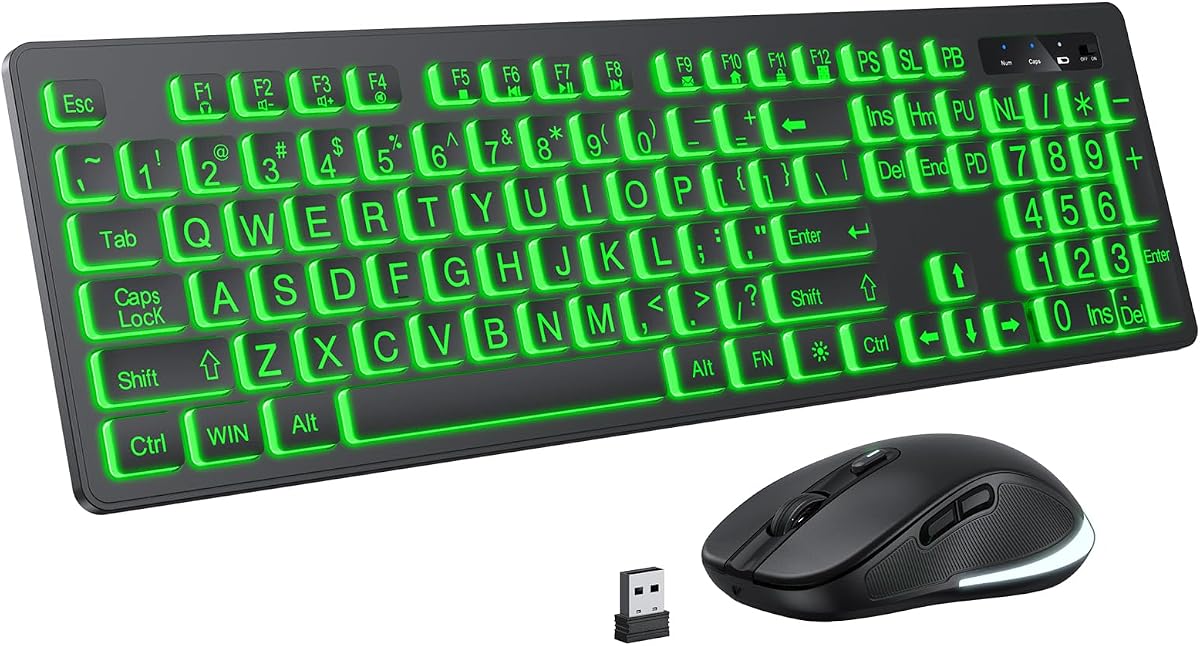
This wireless combo offers large print keys and 7-color backlighting for an easy typing experience. The rechargeable design ensures long usage without frequent battery changes.
We may earn a commission when you buy through this link, at no additional cost to you.
The 2.4GHz wireless technology provides stable connectivity up to 33ft. An energy-saving feature turns off the backlight after inactivity to extend battery life.
The shared USB receiver simplifies setup, though locating it may require checking the keyboard back. Mac users should note potential multimedia key limitations.
Perfect for those wanting a cord-free setup with clear visibility. The included mouse adds value, making it a complete solution for home or office use.
2.4GHz connection ensures stable, lag-free typing up to 33 feet.
Rechargeable design reduces waste compared to disposable batteries.
We may earn a commission when you buy through this link, at no additional cost to you.
The Perixx PERIBOARD-317 offers low-profile keys with a large print font for visibility. Its 5.25ft cable allows flexible desk placement without clutter.
We may earn a commission when you buy through this link, at no additional cost to you.
This keyboard supports up to 10 million keystrokes, ensuring durability. The white LED backlight helps in dim environments, though brightness is limited to on/off adjustment.
Mac users should note that the Scroll Lock function may interfere with backlighting. The plug-and-play setup avoids the need for driver installation.
Ideal for users seeking a reliable, quiet keyboard with large keys. Its simple functionality and long cable make it a practical desk companion.
A 5.25ft USB cable gives you freedom to place your keyboard anywhere.
Rated for 10 million keystrokes, ensuring long-term reliability.
We may earn a commission when you buy through this link, at no additional cost to you.
This model features oversized keys and a foldable wrist rest to reduce fatigue. The white LED backlight ensures visibility, though it stays on in standby mode.
We may earn a commission when you buy through this link, at no additional cost to you.
The included keyboard cover protects against dust and spills, extending the device's lifespan. Its full-size layout supports efficient data entry for office tasks.
Mac compatibility is standard, but multimedia keys may have limited functionality. The silent rebound keys provide a smooth typing experience.
Perfect for seniors or low-vision users seeking accessibility features. The wrist rest and cover add significant value to this ergonomic design.
Foldable wrist support reduces strain during extended typing sessions.
Original keyboard cover prevents dust and spills from damaging keys.
We may earn a commission when you buy through this link, at no additional cost to you.
This keyboard combines large print keys with a wrist rest for comfort. Its 7-color backlighting allows customization, with 3 brightness levels to suit preferences.
We may earn a commission when you buy through this link, at no additional cost to you.
The kickstand supports an ergonomic typing angle, while the soft-touch keys ensure silent operation. It connects via USB with no driver requirements.
Mac users should note that multimedia keys may not fully work on the system. The model is strictly wired, so wireless seekers should look elsewhere.
Ideal for those prioritizing ergonomics and visual clarity. Its comfortable design and vibrant lighting make it a great choice for office or gaming use.
Wrist rest and kickstand support reduce hand strain significantly.
Choose from seven colors to match your workspace style.
We may earn a commission when you buy through this link, at no additional cost to you.
Selecting a backlit illuminated keyboard requires balancing visibility, ergonomics, and compatibility to match your specific needs.
Look for adjustable brightness levels and color options to suit your environment. Models offering multiple lighting modes provide flexibility for different times of day.
Choose a keyboard with customizable lighting to enhance visibility and aesthetics.
Full-size keyboards offer number pads and multimedia keys, while compact models save space. Consider your desk size and whether you need extra keys.
Match the layout to your workflow for optimal productivity and comfort.
Wired connections ensure stability without battery concerns, while wireless offers freedom of movement. Decide based on your setup needs and portability requirements.
Choose the connection type that best fits your workspace and usage patterns.
Large print keys are essential for users with vision challenges or those who need clear visibility. They reduce typing errors and strain during long sessions.
Opt for oversized fonts if visibility is a priority for your needs.
Silent typing mechanisms like membrane or scissor switches reduce noise in shared spaces. Quiet keyboards enhance comfort and minimize distractions.
Select a silent model if you work in quiet environments or shared offices.
Features like wrist rests, adjustable feet, and key curvature improve comfort. These design elements reduce strain during extended typing sessions.
Prioritize ergonomic designs to prevent fatigue and maintain health.
Look for spill-resistant designs and high keystroke ratings for longevity. Durable keyboards protect against accidents and last longer.
Choose robust materials and construction for reliable long-term use.
Ensure the keyboard supports your OS, especially multimedia keys. Some models have limited Mac functionality that could affect workflow.
Verify compatibility with your system to avoid feature limitations.
Connect the keyboard to your device using the provided USB cable or receiver. Ensure the port is secure and the system recognizes the device automatically.
Adjust backlight settings using the specified function keys to set preferred brightness levels. Cycle through available modes to find a comfortable lighting option.
Clean the surface regularly with a soft, dry cloth to maintain clarity. Avoid excessive liquids to prevent damage to internal components.
Yes, backlit keyboards significantly improve visibility in dark environments. The illuminated keys reduce eye strain and help users type accurately without external lighting.
Large print keyboards are ideal for seniors or visually impaired users. They offer clear visibility that benefits anyone needing larger, easier-to-read character keys.
Most keyboards support Mac OS but may have limited multimedia key functionality. Always check compatibility notes before purchasing to ensure full feature access.
Brightness is typically adjusted using function key combinations. Refer to the user manual for specific key sequences to cycle through lighting levels.
Wired keyboards generally offer stable connectivity without battery dependency. Wireless models provide convenience but may experience occasional latency or charging needs.
Use a soft, dry cloth to wipe keys and remove dust. Avoid liquids or excessive pressure to prevent damage to the backlighting elements.
The top picks offer diverse features from silent typing to wireless convenience. Each model provides clear visibility and ergonomic benefits suited to various needs.
Consider your priority factors like print size or customization before deciding. Balancing budget with desired features ensures the best investment.
Remember to check current availability and pricing for the most accurate choices. This guide helps simplify the process to find your ideal keyboard.