
Logitech B100
4.6Editor score
Zero setup connectivity
Ambidextrous comfortable shape
Side-to-side scrolling
This guide compares the top ten durable computer mouse models for longevity and performance to help you choose the right reliable device for your daily
Finding a durable computer mouse ensures your workflow remains uninterrupted by hardware failures or wear and tear over time. Quality devices withstand daily clicking and movement without losing precision or comfort during extended use.
We evaluated ten top-rated models based on build quality, battery life, ergonomics, and tracking performance across various surfaces. Each product offers unique strengths tailored to different hand sizes and usage scenarios for maximum reliability.
Every pick highlights specific durability features and real-world performance data to guide your decision. Prices may fluctuate, so check current listings for the most accurate availability and deal information before purchasing.
4.6Editor score

4.5Editor score

4.5Editor score
This side-by-side comparison highlights key specifications and features across all ten durable computer mouse options to help you identify the perfect match for your specific workflow requirements.





The Logitech M705 Marathon stands out as a top choice for users seeking longevity and reliability in their daily computing tasks. Its robust build quality ensures it can withstand heavy usage without compromising on performance or comfort over time.
We may earn a commission when you buy through this link, at no additional cost to you.
This mouse features a hyper-fast scrolling wheel that allows you to navigate long documents with ease, while the laser grade tracking ensures precise cursor control on almost any surface. The sculpted shape guides your hand naturally, reducing strain during extended work sessions.
While it requires the Unifying receiver which might occupy a USB port, the convenience of leaving it plugged in outweighs this minor inconvenience for most users. The three-year battery life also means you rarely need to replace batteries, adding to the overall value.
If you prioritize durability and efficiency for office work or browsing, this model delivers exceptional performance that justifies its position as a top-tier option for a durable computer mouse.
The M705 Marathon offers up to three years of battery life between changes, making it highly reliable for users who prefer minimal maintenance and uninterrupted workflow.
Laser grade tracking ensures smooth cursor control even on challenging surfaces like wood grain or polished tables, providing accuracy that standard optical mice often lack.
We may earn a commission when you buy through this link, at no additional cost to you.
The Logitech B100 proves that affordability and durability can coexist without compromising essential functionality. As a wired model, it eliminates battery concerns entirely while offering consistent performance for basic computing tasks.
We may earn a commission when you buy through this link, at no additional cost to you.
Its ambidextrous shape makes it comfortable for both left and right-handed users, ensuring ergonomic support regardless of your dominant hand. The zero setup means you can plug it in and start working immediately without installing drivers or software.
While the lack of wireless capability may not suit everyone, the reliability of a direct USB connection is unmatched for environments where stability is paramount. The build quality ensures it can withstand regular use without degradation over time.
For users needing a straightforward, durable computer mouse for daily office work or general use, this model provides excellent value and dependability at a fraction of the cost of premium options.
Designed to be comfortable for both hands, the ambidextrous shape ensures reduced strain during long work sessions, making it accessible for diverse user preferences.
Zero setup connectivity allows for immediate plug-and-play use, removing the need for complex configuration and ensuring productivity starts instantly.
We may earn a commission when you buy through this link, at no additional cost to you.
The Logitech Signature M650 L represents the pinnacle of wireless durability and premium comfort for users who value quiet operation and advanced customization. Its robust construction ensures it can handle extensive daily use without issues.
We may earn a commission when you buy through this link, at no additional cost to you.
SilentTouch technology reduces click noise by ninety percent, making it ideal for shared offices or environments where sound distractions are a concern. The customizable side buttons allow you to tailor shortcuts that boost your workflow efficiency significantly.
Although it comes at a higher price point and is available primarily in a large size, the comfort it provides for larger hands is unmatched. The two-year battery life ensures you won't face frequent interruptions for power changes.
If you seek a top-tier durable computer mouse that combines quiet performance with premium ergonomics and smart features, this model stands out as a compelling investment for professionals.
SilentTouch technology reduces click noise significantly, promoting better focus and reducing disturbance in shared workspaces or quiet home offices.
Side buttons can be customized with Logitech Options+ to perform specific shortcuts, enhancing productivity by allowing quick access to frequently used commands.
We may earn a commission when you buy through this link, at no additional cost to you.
The Logitech M185 is an excellent choice for users needing a compact and durable computer mouse that travels well without sacrificing reliability. Its small form factor fits easily into laptop bags or tight desks spaces.
We may earn a commission when you buy through this link, at no additional cost to you.
With one year of battery life and smart sleep mode, it ensures you won't face frequent interruptions for replacements. The ambidextrous shape makes it comfortable for both left and right-handed users despite its compact size.
While the scroll wheel lacks advanced features like side scrolling, it provides reliable line-by-line navigation suitable for general tasks. The nano USB receiver stays securely in your computer, minimizing the risk of loss.
For travelers or those with limited desk space who need a robust wireless mouse, the M185 offers a balance of durability, portability, and cost-effectiveness that is hard to match.
The compact design and small weight make this mouse ideal for travel, fitting effortlessly into bags without adding bulk to your setup.
Smart sleep mode extends the battery life to up to one year, ensuring consistent performance over long periods with minimal maintenance.
We may earn a commission when you buy through this link, at no additional cost to you.
The Logitech M510 delivers outstanding comfort and durability for users who work long hours and need reliable support for their hands. Its contoured shape and soft rubber grips provide exceptional ergonomic benefits throughout the day.
We may earn a commission when you buy through this link, at no additional cost to you.
With two years of battery life and side-to-side scrolling capabilities, this mouse enhances productivity by making navigation through large documents and spreadsheets easier. The broad palm area ensures your hand remains supported and relaxed.
While the full size may feel bulky for smaller hands or tight desks, the comfort it offers justifies the footprint for most users. The Unifying receiver allows you to connect multiple devices without using extra ports.
If you prioritize ergonomic support and extended battery life in a durable computer mouse for heavy daily use, the M510 stands as a highly reliable and versatile option.
The contoured shape with soft rubber grips supports your hand naturally, reducing strain and fatigue during prolonged work sessions.
Side-to-side scrolling plus zoom gives you the power to navigate complex files and maps efficiently, speeding up your workflow significantly.
We may earn a commission when you buy through this link, at no additional cost to you.
The TECKNET USB Wired mouse is a robust option for users seeking a durable computer mouse with advanced features at a budget-friendly price. Its build quality ensures it can withstand over six million keystrokes without degradation.
We may earn a commission when you buy through this link, at no additional cost to you.
With four adjustable DPI levels and forward backward keys, this mouse enhances productivity by allowing you to switch sensitivity instantly for different tasks. The ergonomic design with rubber grips ensures comfortable use during extended sessions.
While it lacks wireless freedom and has limited compatibility with Mac side buttons, the reliability of a wired connection is valuable for consistent performance. The five-foot cable provides sufficient length for most desktop setups without clutter.
For those needing a cost-effective, feature-rich, and durable mouse for office or home use, the TECKNET model offers excellent longevity and functionality.
Four adjustable DPI settings let you tailor cursor sensitivity to your exact needs, improving accuracy for detailed tasks or general browsing.
Large forward and backward buttons help you navigate web pages and documents quickly, boosting efficiency with minimal clicks.
We may earn a commission when you buy through this link, at no additional cost to you.
The Logitech Signature M550 L is designed for users who need a silent and durable computer mouse that supports comfort during long workdays. Its robust build ensures it lasts through daily use without issues.
We may earn a commission when you buy through this link, at no additional cost to you.
SilentTouch technology reduces click noise significantly, making it perfect for shared offices where sound is a concern. The SmartWheel allows you to switch between precise line-by-line scrolling and super-fast scrolling effortlessly.
While it is designed primarily for larger hands, the comfort it provides is exceptional for those needing a full-size option. The dual connectivity options via Bluetooth or USB receiver offer flexibility for different setups.
If you prioritize quiet operation and reliable battery life in a comfortable durable mouse, the M550 L offers an excellent solution for professional environments.
SmartWheel scrolling lets you switch modes instantly, optimizing navigation speed for long documents versus precise editing tasks.
SilentTouch technology ensures minimal noise, promoting a focused environment in shared offices or quiet home workspaces.
We may earn a commission when you buy through this link, at no additional cost to you.
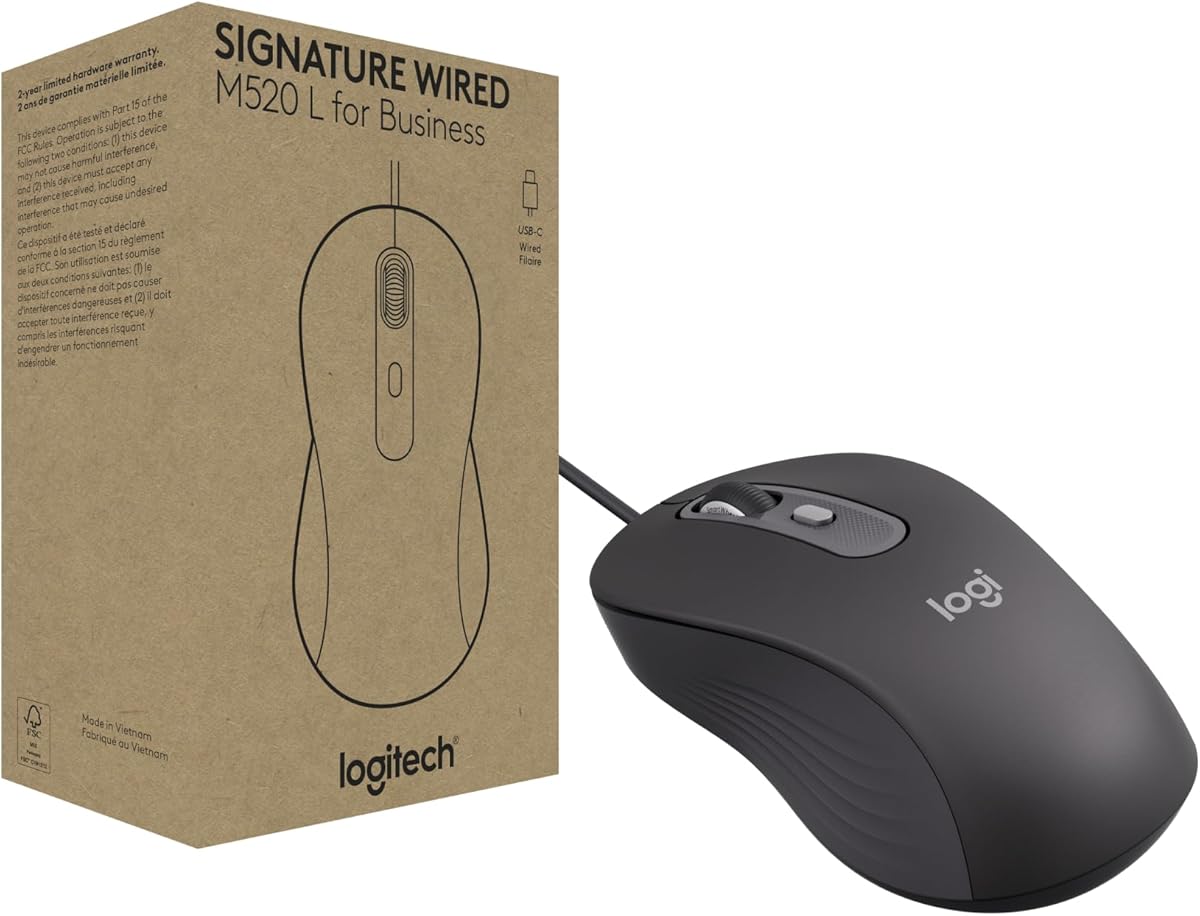
The Logitech Signature M520 L is tailored for business environments requiring a durable and quiet computer mouse. Its USB-C connectivity makes it future-proof for modern laptops and devices.
We may earn a commission when you buy through this link, at no additional cost to you.
With SilentTouch technology reducing click noise by ninety percent, it minimizes distractions in open workspaces. The SmartWheel allows you to switch between precise and fast scrolling modes easily.
While its design is business-focused and wired, the reliability and multi-OS compatibility ensure it works across various systems without issues. The ambidextrous design ensures comfort for all users regardless of handedness.
For organizations and professionals needing a reliable, durable, and efficient mouse for daily business tasks, this model offers practical features and solid construction.
SilentTouch technology reduces click noise to promote focus in open office environments where distractions can impact productivity.
Multi-OS support ensures seamless operation across Windows, macOS, Chrome OS, and Linux systems, simplifying deployment in diverse IT setups.
We may earn a commission when you buy through this link, at no additional cost to you.
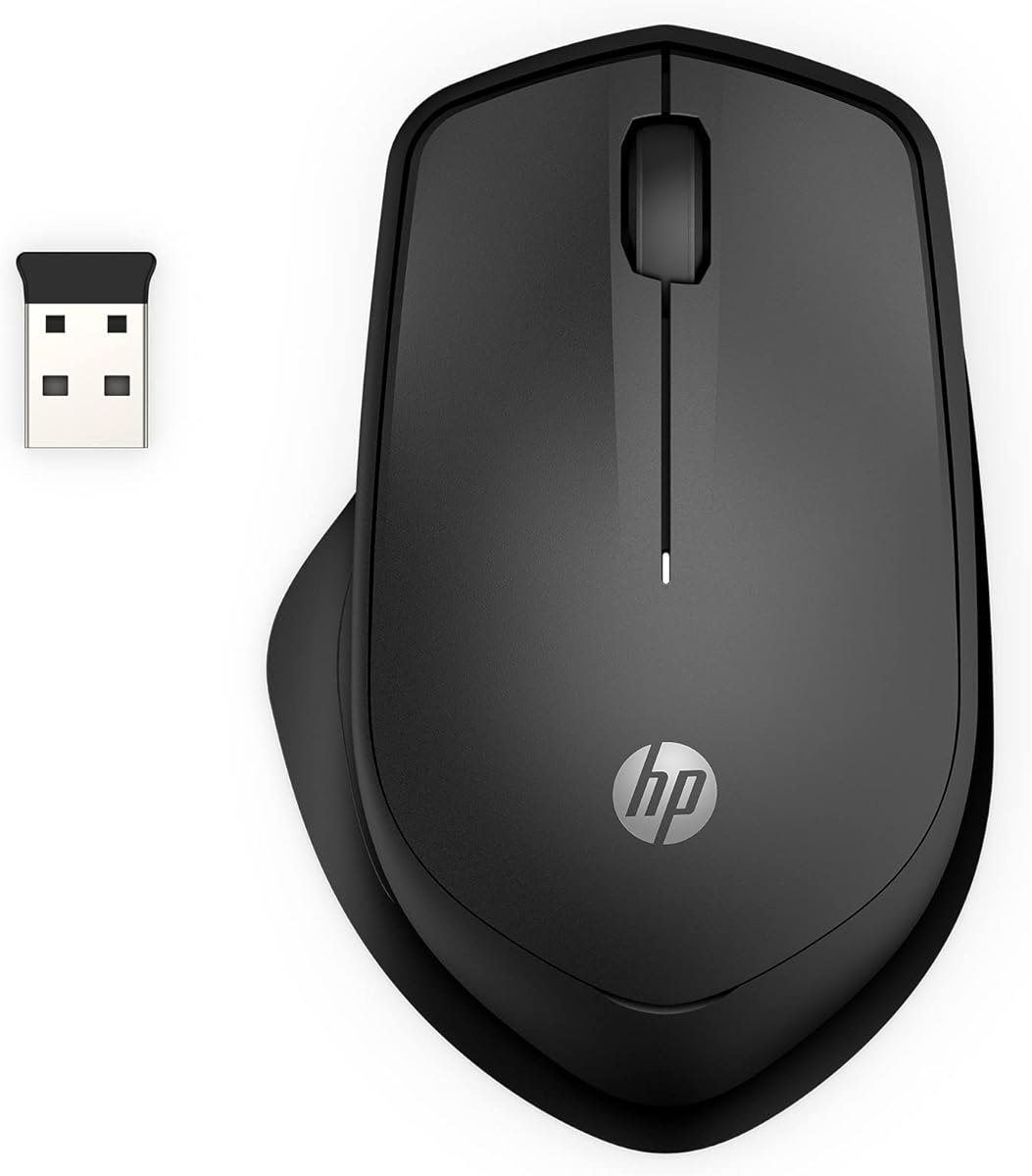
The HP 280 Silent is a solid mid-range option for users seeking a durable computer mouse with effective quiet features. Its ergonomic design ensures comfort for right-handed users during extended sessions.
We may earn a commission when you buy through this link, at no additional cost to you.
Multi-surface technology eliminates the need for a mouse pad, providing smooth tracking on various materials. With up to eighteen months of battery life, it offers reliable wireless performance without constant replacements.
While it is restricted to right-handed users, the precision control and noise reduction features make it a strong choice for general productivity. The USB-A receiver stores inside the mouse for easy portability.
If you need a dependable, comfortable, and quiet mouse for everyday computing tasks, the HP 280 Silent provides a balanced mix of features and reliability.
Smooth tracking on various surfaces means you don't need a mouse pad, enhancing portability and convenience for travel or different workstations.
Up to eighteen months of battery life ensures long-term reliability, reducing the need for frequent battery changes and maintenance.
We may earn a commission when you buy through this link, at no additional cost to you.
The Acer Wireless Mouse offers a budget-friendly entry into durable computing with impressive longevity and feature set. Its design aims to balance cost with practical functionality for daily laptop use.
We may earn a commission when you buy through this link, at no additional cost to you.
Rated for up to ten million clicks, it provides strong durability for a low-cost device. The five adjustable DPI levels and forward backward buttons help boost efficiency and workflow speed significantly.
While the build materials are basic compared to premium options, the visible indicator and power-saving modes add practical value. The nano receiver stores inside the mouse for easy transport and setup.
For users seeking an affordable yet durable computer mouse for travel or general office tasks, this Acer model delivers reliable performance with thoughtful efficiency features.
Rated for up to ten million clicks, this mouse ensures long-term use without frequent failure, making it ideal for heavy daily usage.
Five adjustable DPI levels let you choose the right sensitivity for detailed design work or general navigation, boosting flexibility and efficiency.
We may earn a commission when you buy through this link, at no additional cost to you.
Choosing a durable computer mouse requires balancing build quality, features, and ergonomics to match your specific needs and budget.
A durable computer mouse should be constructed from high-quality plastics or rubber that resist wear and tear. Look for reinforced click mechanisms and sturdy cables if it is wired.
Prioritize models rated for millions of clicks to ensure long-term functionality.
Comfort is crucial for longevity since an uncomfortable mouse can lead to strain over time. Consider your dominant hand and grip style when choosing between ambidextrous or right-handed designs.
Ensure the shape supports your palm and fingers without causing pressure points during long sessions.
Decide between wired and wireless options based on your usage habits. Wired mice offer consistent connectivity without battery concerns while wireless provide greater freedom of movement.
If choosing wireless, verify the battery life and connection stability features like Bluetooth or 2.4GHz receivers.
High-quality optical or laser sensors ensure accurate cursor movement across various surfaces. Look for adjustable DPI settings to match your preferred speed and sensitivity.
Advanced tracking technology prevents skips and lags that can disrupt workflow and frustration.
For wireless durable computer mouse models, long battery life is essential to reduce maintenance. Some models offer years of life on a single battery or include rechargeable options.
Check if the mouse includes power-saving modes that automatically activate during inactivity.
Ensure the mouse works seamlessly with your operating system whether Windows, Mac, or Linux. Additional features like side buttons or quiet clicks can enhance productivity based on your workflow.
Customization software may be required for advanced features so check availability for your platform.
A solid warranty reflects the manufacturer's confidence in the product's durability. Look for extended coverage that includes defects or wear and tear for peace of mind.
Reliable customer support ensures you can resolve issues quickly without prolonged downtime.
While price is a factor, prioritize overall value over the lowest cost. A slightly expensive durable mouse may save money long-term by reducing replacements and repairs.
Balance your budget with the features and build quality you need for consistent performance.
To maintain optimal performance, regularly clean the surface of your mouse with a soft, dry cloth to remove dust and debris. For optical sensors, gently wipe the underside to ensure accurate tracking on your desk or mat.
For wireless models, check battery levels periodically and store the device in a cool dry place when not in use for extended periods. Avoid exposing the mouse to moisture or extreme temperatures that could damage internal components.
Customize settings such as sensitivity and button assignments using manufacturer software to suit your workflow. Periodically update firmware if available to ensure compatibility and access to new features.
Durability in a computer mouse comes from quality materials, reinforced switch mechanisms, and robust construction. Look for mice rated for millions of clicks and tested for resistance to wear and tear over time.
A high-quality durable computer mouse can last several years depending on usage intensity. With proper care and regular cleaning, models with strong build quality may exceed typical lifespan expectations significantly.
Wired mice eliminate battery concerns and signal interference issues, which can contribute to longevity. However, modern wireless models often feature strong build quality and long battery life that rivals wired counterparts.
Use a soft, dry cloth to wipe the exterior surface. For optical sensors, gently clean the bottom lens area. If available, use compressed air to remove dust from crevices and button gaps.
Hand size affects ergonomics and comfort rather than physical durability. Choosing a mouse that fits your hand reduces strain and wear on your muscles but not on the device itself.
A good DPI range typically spans from 800 to 1600 for general use, but adjustable settings allow higher values for gaming or detailed work. Higher DPI provides faster cursor movement across screens.
Lagging can be caused by dirt, low battery, or outdated firmware. Try cleaning and updating first before replacing. If issues persist despite troubleshooting, it may be time for a new durable computer mouse.
Most reputable brands offer a one to three-year limited warranty covering defects. Check for additional coverage options to protect against wear and tear if you anticipate heavy daily use.
Our top picks highlight a range of durable computer mouse options that excel in longevity, comfort, and performance. The Logitech M705 Marathon offers exceptional battery life and tracking, while the M500 provides affordable reliability for everyday use.
Prioritize features that matter most to your workflow whether it is silent operation, ergonomic support, or wireless convenience. Investing in a well-built model ensures your device serves you well for years without issues.
Remember to check current prices and availability before purchasing as these factors may vary over time. We hope this guide helps you find the perfect durable mouse to enhance your computing experience.